Real-time BI · Live now

Dashboards: Every Visit, Lead and Conversion — Live

One real-time dashboard for every client site you manage. Unique users, page views, conversions, channels and campaigns — updated as they happen. No GA4 archaeology required.
The real thing: ten live screenshots below ↓

Real-time tracking Multi-site rollup 6 languages GDPR ready
area.digenio.ai/v2/dashboard
14 online now
1,284
Unique users
▲ 12.4%
4,902
Page views
▲ 8.1%
57
Conversions
▲ 21.0%
4.4%
Conv. rate
▼ 0.3%
Users by channel · last 14 days
Organic / direct Paid campaigns
Top campaigns · live
spring-newsletter
312
google/brand
233
linkedin/offer
149
The old way

GA4 Archaeology Is Not a Strategy

Traditional analytics makes you dig for answers that should be on your first screen.

Data arrives too late

Reports lag by 24–48 hours. By the time a campaign underperforms, the budget is already spent.

One site, one report

Every client site is a separate analytics account. There's no single view of how the whole portfolio performs.

Visits, not business

Page views without conversions tell you nothing. You need to see the lead — and where it came from — in the same screen.

One screen for "how are we doing?"

Everything That Matters, On One Screen

The Digenio dashboard turns raw tracking events into live answers for marketing managers and account teams.

Real-time users & channels

See who's on the site right now, which pages they're viewing, and which channels brought them — live, not tomorrow.

Live view

KPI strip

Unique users, page views, conversions and conversion rate — headline numbers with period-over-period deltas at a glance.

Core metrics

Channel & campaign time series

Interactive charts show where growth comes from — organic, paid, social, email — with campaign highlights per source.

Growth analysis

Digital funnel

Follow the full journey: visits → engaged sessions → form interactions → conversions. Spot exactly where people drop off.

Conversion path

Engagement & top pages

Engagement charts reveal visit quality — not just quantity — while Top Pages Live shows what people are reading right now.

Quality signal

Templates & versions

Save any dashboard as a template and roll it out per client. Every dashboard is versioned — repeatable reporting at agency scale.

Agency-ready
Under the hood

From Click to Chart in Seconds

1

Capture

Smart Tracking drops a first-party cookie on each site and records every page view, UTM tag and form event as it happens.

2

Route

Each event hits the Backbone, which validates the domain, resolves the tenant and writes it to that client's isolated shard database.

3

Aggregate

Aggregation APIs roll raw events up into metrics: users, sessions, channels, campaigns, funnels — per client or across the portfolio.

4

Visualise

ApexCharts widgets render the numbers live — KPI strips, time series, scatter charts and tables, refreshed automatically.

In the product

The Main Dashboard, Widget by Widget

A representation of the v2 dashboard UI. Layouts are configurable per dashboard template.

Global metrics
3,412
Users
12,940
Views
128
Convs.
3.7%
Rate

KPI strip with configurable date range and comparison period.

Time series

Users, views and conversions charted over time — filter by channel or campaign.

Top pages live
/pricing
418
/features
336
/blog/cro-guide
250
/demo
172

Live page ranking with sessions and entry referrers.

Inside the product

Real Screens, Real Answers

Every widget below is a live screenshot from the v2 Dashboards — real traffic, real zeros, real spikes. No mockups. The product UI ships in English and Italian.
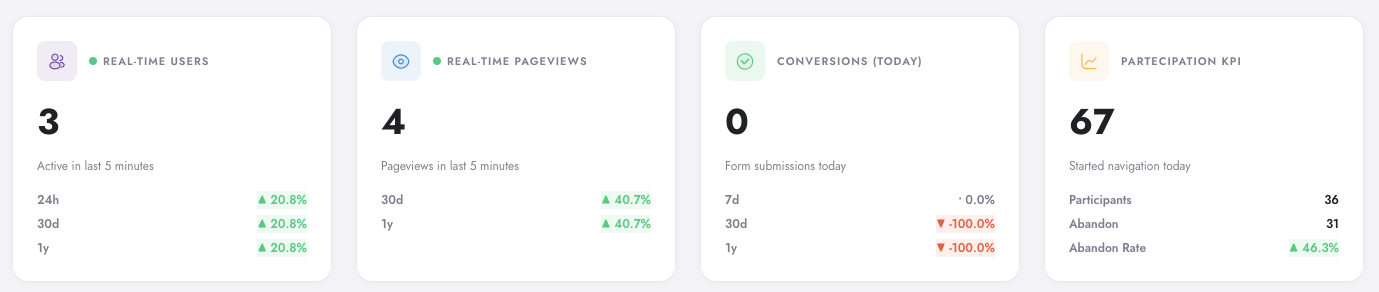
Right now
Real-time KPI cards in Digenio AI v2: 3 real-time users, 4 real-time pageviews, 0 conversions today, participation KPI 67, each with period deltas
1

The pulse, with its deltas

Four live cards: Real-Time Users 3 (active in the last 5 minutes, ▲20.8%), Real-Time Pageviews 4 (▲40.7%), Conversions Today 0 (▼−100%, shown anyway — a quiet day is data, not an embarrassment), Participation KPI 67. Every card carries its 24h/30d/1y trend, so "3 users right now" comes with "and that's up 20% on the month."

  • Live dots on the real-time cards — 5-minute windows
  • Deltas on every KPI: 24h, 30d and 1y context
  • Zeros stay on screen with their trend, never hidden
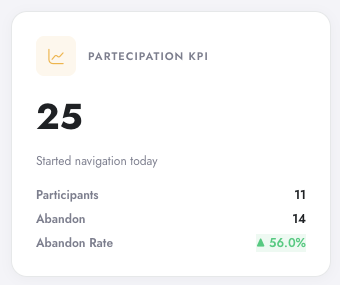
Participation KPI card in Digenio AI v2: 25 started navigation today, 11 participants, 14 abandon, abandon rate 56 percent
2

Navigation started vs. finished

The Participation KPI in close-up: 25 people started navigating today, 11 became participants, 14 abandoned — a 56.0% abandon rate, trend arrow attached. Most dashboards count visits; this one counts whether the visit became a session that did anything. It's the honesty metric that sits above everything else.

  • Started → participated → abandoned, one card
  • Abandon rate with trend, not a raw count
  • Daily grain — today's number updates as the day runs
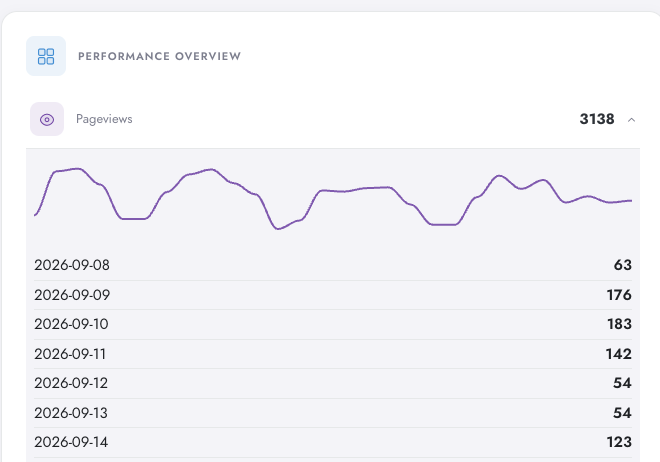
The period in review
Performance Overview in Digenio AI v2: 3138 pageviews, 69 users, 1.26 average session, 88.7 percent abandon rate, 5 conversions
3

The period on five lines

Performance Overview, collapsed: Pageviews 3,138 · Users 69 · Avg. Session 1.26 · Abandon Rate 88.7% · Conversions 5. Five metrics that fit in one glance — and each row expands into its own daily chart when you want the story behind the number.

  • Views, users, session depth, abandon, conversions — the quintet
  • Expandable rows: summary first, detail on demand
  • Same period across every metric — no mixed windows
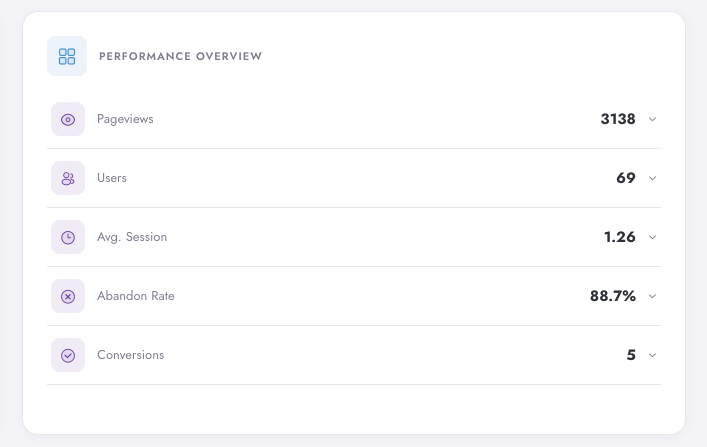
Pageviews metric expanded in Digenio AI v2: 3138 total with daily values listed from 63 to 183
4

Any metric, exploded into days

Click the chevron and Pageviews opens its daily series: 63 → 176 → 183 → 142 → 54 → 54 → 123. The launch-day spike, the weekend dip, the recovery — every point hoverable, every date listed. Summaries answer "what"; expansions answer "when".

  • One click from total to daily grain
  • Line chart plus the full date list under it
  • Spikes you can pin to actual days, not vibes
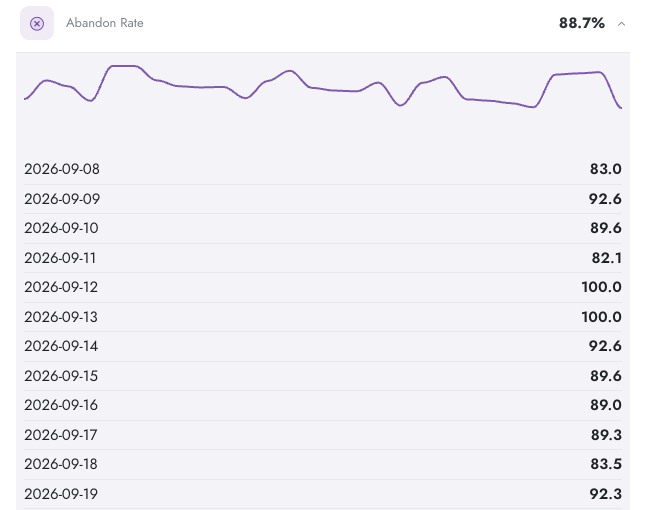
Abandon Rate metric expanded in Digenio AI v2: 88.7 percent total with daily values including two weekend days at 100 percent
5

Even the ugly metric gets its chart

Abandon Rate, expanded: 88.7% for the period, 83.0 / 92.6 / 89.6 / 82.1 day by day — and there they are, the two days at 100.0% when nobody converted at all. Most tools bury abandon rate; ours expands it into a daily chart, because the days it hits 100% are the days worth investigating.

  • The uncomfortable KPI, given equal treatment
  • Weekend zeros visible — pattern, not mystery
  • Investigate by date, straight from the chart
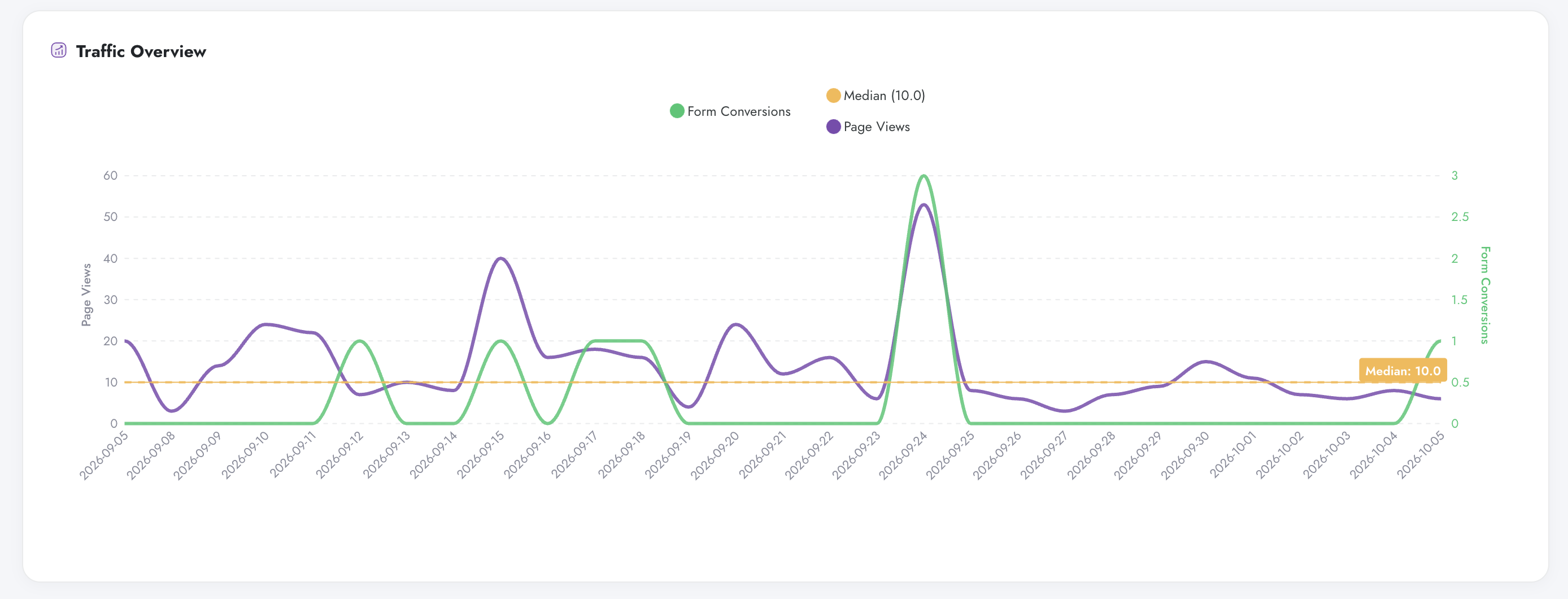
Traffic Overview dual-axis chart in Digenio AI v2: purple page views line and green form conversions line with orange median reference, daily across the period
6

Traffic and conversions, one chart, two axes

Traffic Overview plots the two things you actually want together: Page Views (purple, left axis) and Form Conversions (green, right axis), daily, with a Median reference line at 10.0. Here views peak around the 24th — and the conversion line ticks up with them. Traffic that converts and traffic that just visits finally share one honest picture.

  • Dual axes — scale-honest views vs conversions
  • Median line: "normal" is drawn on the chart
  • Peaks correlate because they're on one timeline
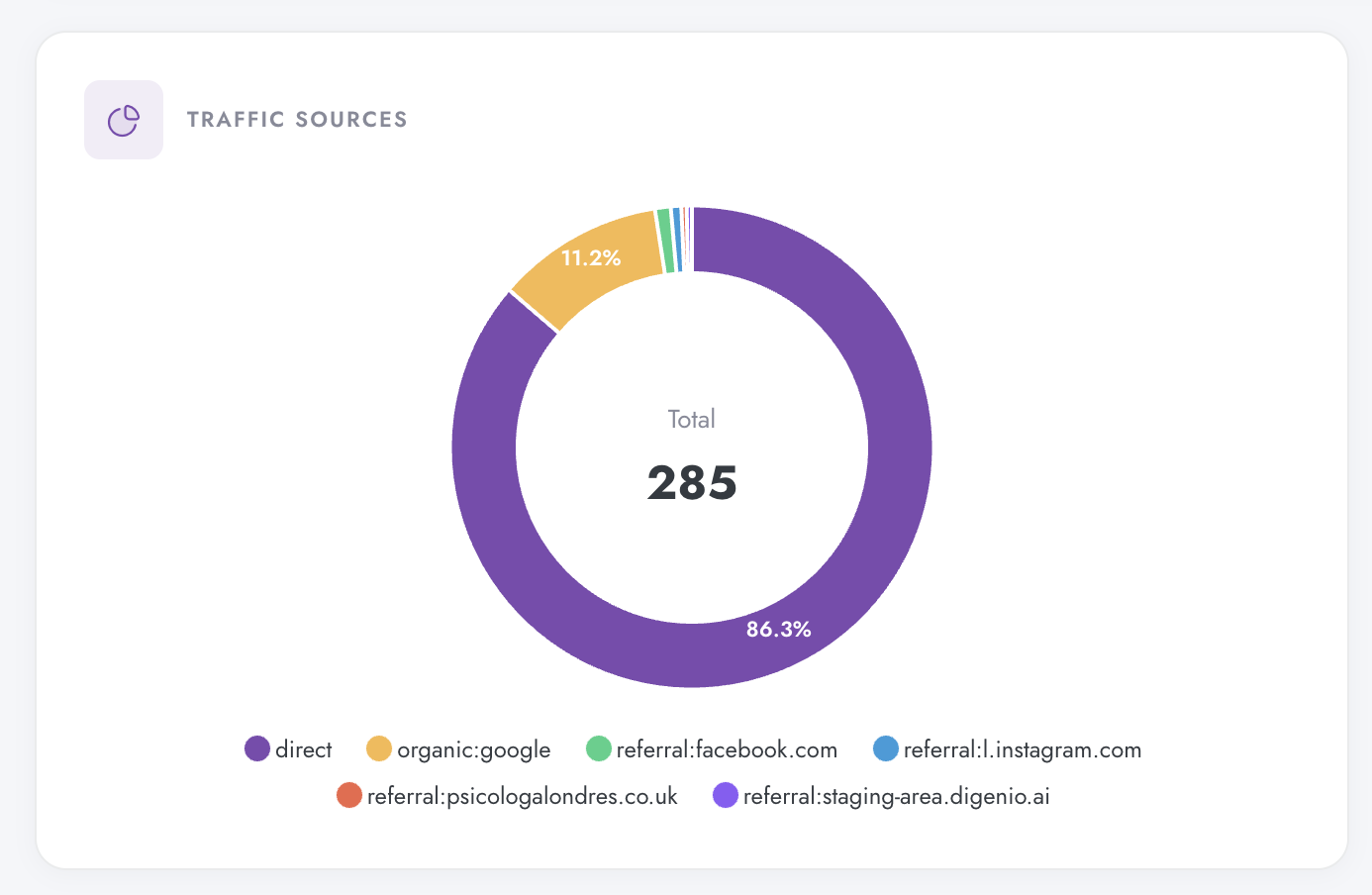
Traffic Sources donut in Digenio AI v2: 285 total sessions, direct 86.3 percent, organic google 11.2 percent, referral slices named in the legend
7

Every session attributed

The Traffic Sources ring, 285 sessions: direct 86.3%, organic:google 11.2%, and the referral slices named in the legend — facebook.com, l.instagram.com, partner and internal domains each with their own wedge. No "other" black box: when three sessions come from one link, you see the link.

  • Buckets plus named referrers, same chart
  • Concentration visible: 86% direct is a strategy conversation
  • Session counts in the center — the denominator, always
Pages & funnel
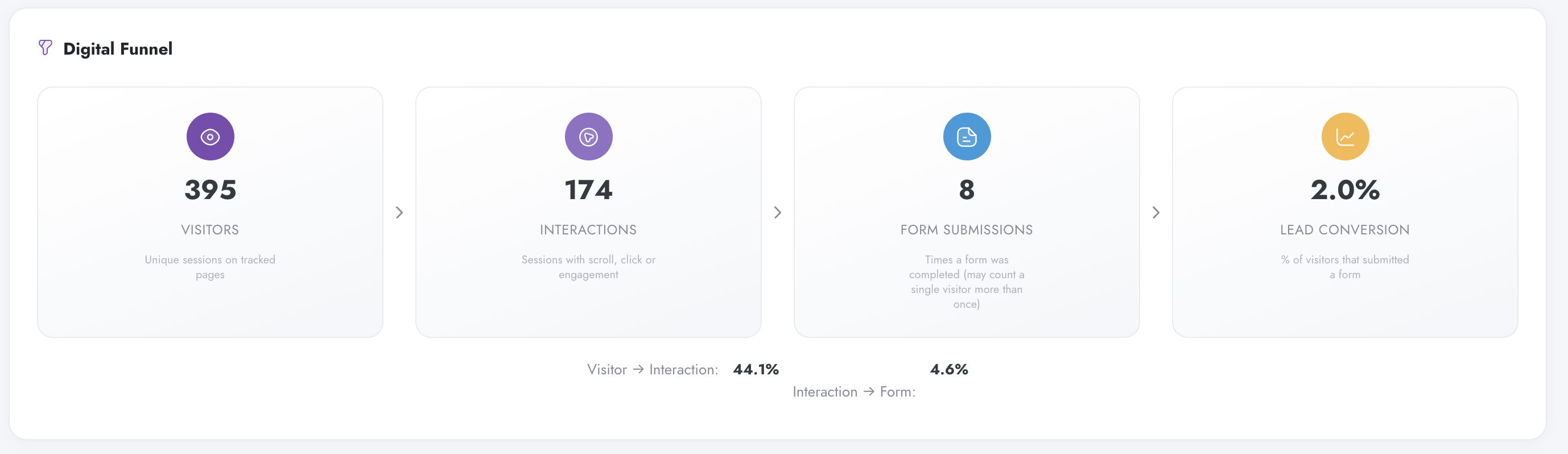
Digital Funnel in Digenio AI v2: 395 visitors, 174 interactions at 44.1 percent, 8 form submissions at 4.6 percent, 2.0 percent lead conversion
8

The funnel that defines itself

Digital Funnel: 395 visitors → 174 interactions (44.1%) → 8 form submissions (4.6%) → 2.0% lead conversion. And every stage prints its own definition underneath — "sessions with scroll, click or engagement", "times a form was completed (may count a single visitor more than once)". Definitions on the chart mean the meeting argues about the site, not the math.

  • Four stages, step rates on every connector
  • Stage definitions printed under the numbers
  • End-to-end conversion: 2.0%, no asterisks
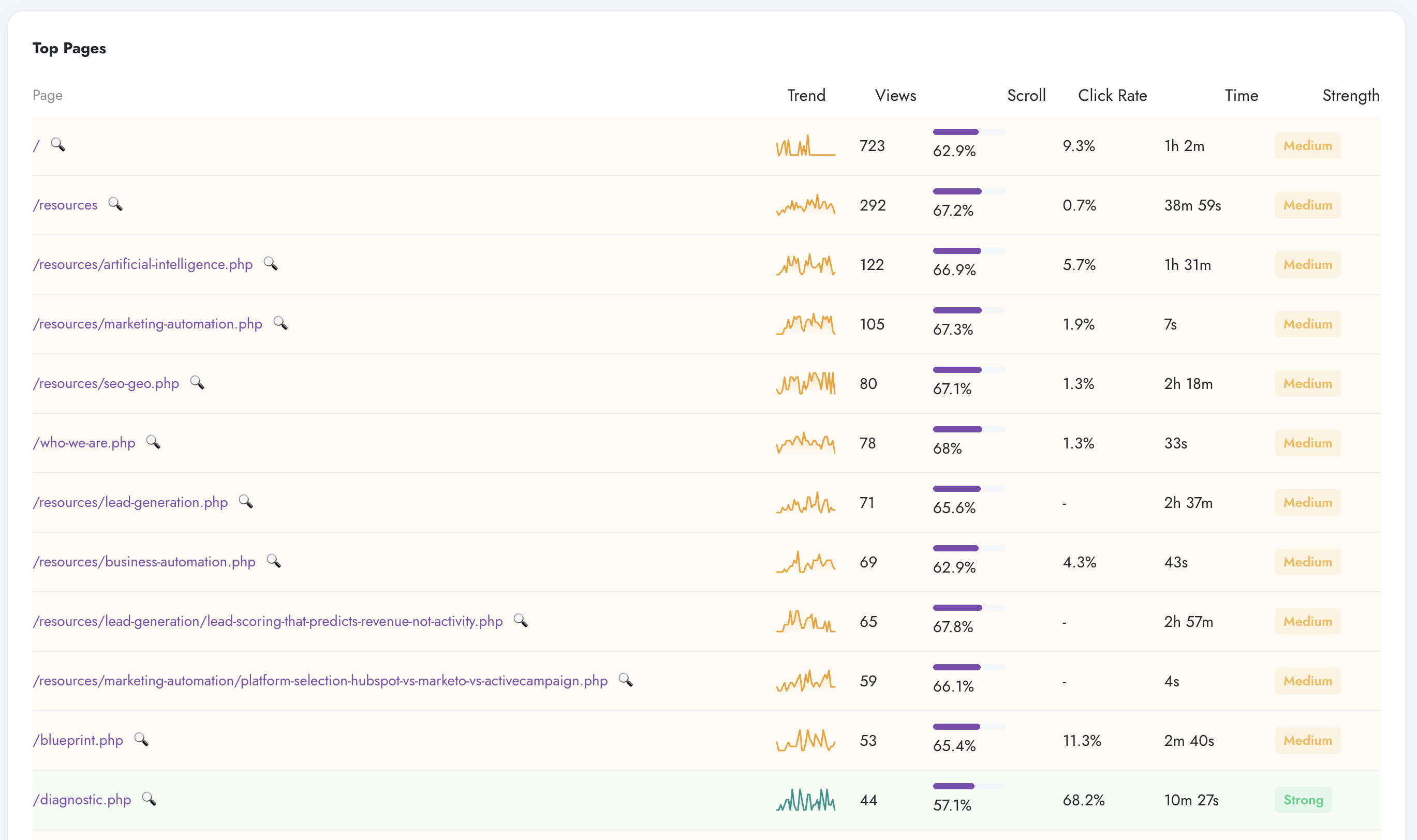
Top Pages table in Digenio AI v2: ranked pages with views, scroll, click rate, time and strength - diagnostic.php flagged Strong with 68.2 percent click rate
9

The Strength column finds the punchers

Top Pages, ranked and measured: / leads with 723 views, 62.9% scroll, 9.3% click rate; /resources 292. But look at row 12: /diagnostic.php — 44 views, a 68.2% click rate and the only **Strong** badge on the board. One-sixteenth of the homepage's traffic, seven times its click rate. That's the page that actually closes, and this table is where it stops hiding.

  • Views, scroll, click rate, time, strength — per page
  • Trend sparklines inline with the ranking
  • Strength badge surfaces over-performers, not just volume

Top Pages Live table in Digenio AI v2: real-time page performance over the last 20 minutes with live, views, scroll and click rate columns
10

The same table, running live

Top Pages Live: the last 20 minutes, the same columns, updating as people move. Fresh pages enter at the top with their live count; quiet pages show honest zeros. It's the view you keep open on the second monitor on launch day — watching the campaign land, page by page, in near-real-time.

  • 20-minute window, continuously refreshing
  • Live counts per page — who's reading what, now
  • Launch-day monitoring without a data team
Data & integrations

Where the Data Comes From, Where It Goes

Sources
  • Smart Tracking events (first-party cookie + UTM)
  • Form submissions & interactions
  • Smartpage sessions & conversions
  • Campaign parameters (source / medium / term)
Backbone
  • Domain-validated event routing
  • Per-client isolated shard database
  • Multi-site rollup into one company view
  • Aggregation APIs feed every widget
Destinations
  • CRM via Sphere connector (leads + attribution)
  • Email notifications on conversions
  • Webhooks for custom pipelines
  • Exportable dashboard reports
FAQ

Questions, Answered

For marketing and lead-generation reporting, yes. Digenio tracks every visit, form interaction and conversion with full UTM attribution — in real time, per client, in one place. Many clients keep GA4 running in parallel and simply stop living in it.
Yes. Build the dashboard layout once, save it as a template, and roll out a version per client site. Each client sees their own data in a dashboard you control — repeatable reporting without rebuilding charts every time.
Tracking starts collecting from the moment Smart Tracking is installed, and history is retained per client on your shard. Dashboards let you compare any two periods, so trend depth grows with your account.
Tracking is consent-first: first-party cookies, consent records stored with every submission, and EU hosting on isolated per-client databases. You can answer any data-subject request without a forensic investigation.
That's the core use case. Every tracked site feeds the same Backbone, so your company-level dashboard rolls up all clients — and each client also gets their own scoped view from the same data.

Stop guessing.
Start knowing.

See exactly which marketing drives revenue —
from first click to closed deal.

Free 7-day trial
GDPR ready