Real Screens, Real Answers
Every shot below is live from the v2 Heatmap — real sites, real sessions, including our sister brand Websfarm under the lens. No mockups, no stock dashboards. The product UI ships in English and Italian.

Pick the page, see its traffic first
"Analyzing: /resources (292 views)" — the picker lists every tracked page with its view count, and one button, "Open with overlay", drops the heatmap straight onto the real page. No export, no screenshot gymnastics: the site renders underneath, the heat renders on top.
- Every tracked page, with traffic shown before you commit
- One click from list to live overlay
- The real page renders under the heat — not a wireframe

One bar: page, period, compare, device
The whole targeting system in a single toolbar: analyzed page (/resources), date range 05/09 → 05/10/2026, a Compare checkbox for period-over-period, and the device trio with live counts — Desktop 2 this period. "Heatmap" toggles the overlay; "Open Direct" shows the page clean, side by side with the heat view.
- Page + date range + comparison in one place
- Heatmap toggle and clean view, one click apart
- Periods explicit — heat always has a date range

Desktop heat is not mobile heat
The device toggle carries its own counts: Desktop 2 selected, tablet and mobile empty this period. When a phone cohort shows up, the same page re-heats for thumbs — menus fold, CTAs move, and the blobs land somewhere else entirely. Blending devices into one map is how teams misread heat; we keep them apart.
- Per-device heatmaps, counts on the icons
- Empty device = honest zero, not hidden data
- Mobile-first pages get mobile-only analysis
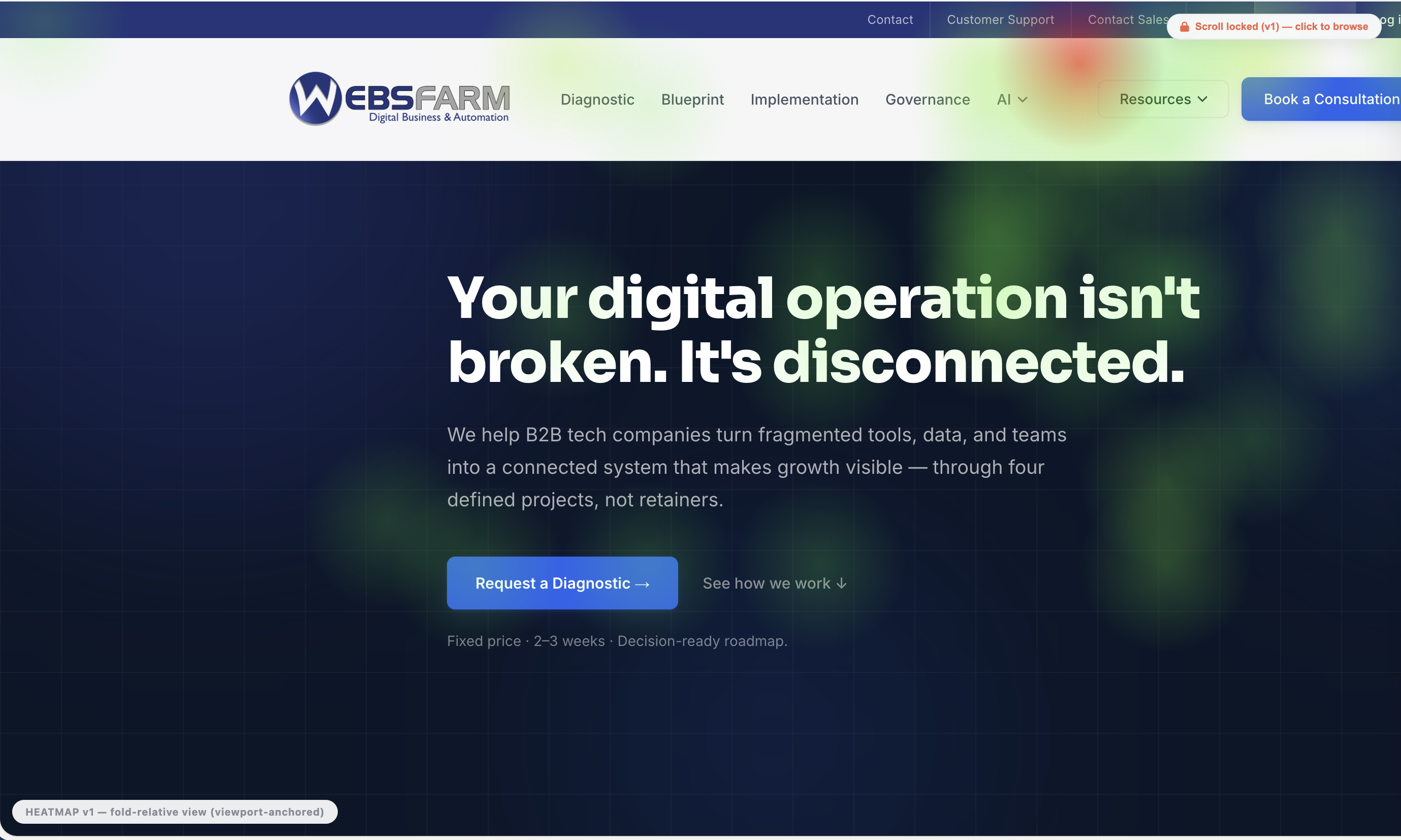
Where attention actually lands
The overlay itself: the real page, fully rendered, with heat clusters exactly where people clicked and tapped — here concentrated on the navigation, the AI menu and the hero CTAs of the analyzed site, fading to cool everywhere else. The badges tell the engineering story: "fold-relative view (viewport-anchored)" — heat is anchored to what visitors actually saw, and "scroll locked" keeps the map honest while you browse.
- Heat on the real page — fonts, menus, forms, all live
- Viewport-anchored: heat tied to what was on screen
- Click a cluster and browse without losing the map
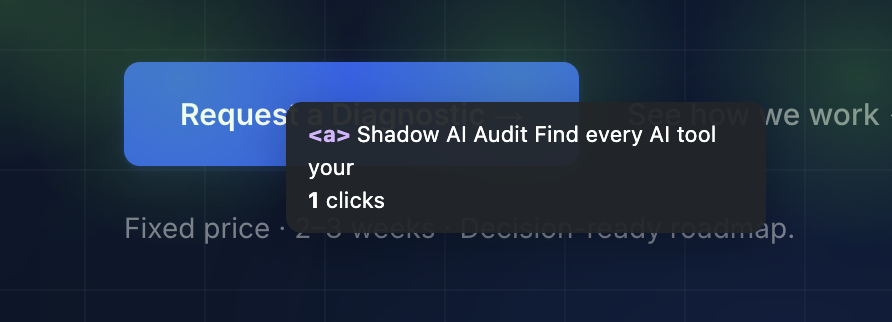
Hover a blob, get the element
Every heat cluster drills down: hover and the tooltip names the exact element — tag, visible text, click count. Here a link ("Shadow AI Audit — Find every AI tool your…", 1 click) under the hero of the analyzed page. The blob is the question; the tooltip is the answer; the fix meeting takes five minutes.
- Element tag + text + clicks on every hover
- From color impression to code-level specificity
- Small counts stay visible — not just the loud zones
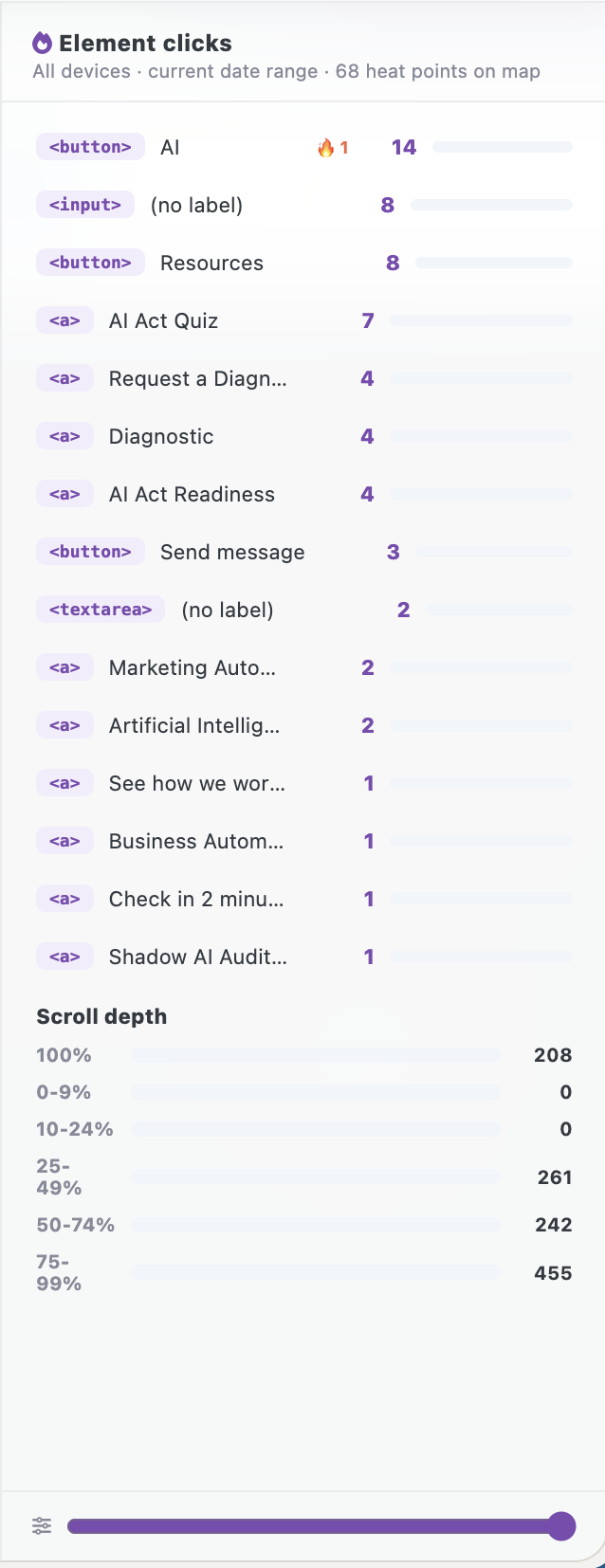
The map, ranked — plus the reading depth
The side panel turns heat into a ranked table: "AI" button 14 clicks, inputs 8, "Resources" 8, "AI Act Quiz" 7, "Request a Diagnostic" 4… 68 heat points on the map, all devices, current range. Below it, scroll depth in six bands — 455 sessions reach 75–99%, 208 hit the absolute bottom, and nobody stops before 25%. An opacity slider tunes the overlay when you present it.
- Element clicks ranked with counts, synced to the map
- Scroll-depth bands beside clicks — depth and heat, one panel
- Opacity control for demos and screenshots

The numbers the heat rides on
The period strip framing every map: 725 pageviews, 659 unique visitors, 28s average time, 97.7% bounce, 2 conversions — plus a traffic sparkline with forecast tail, 4,205 total users (4,327 sessions) and new/returning split (4,196/9). A 97.7% bounce with two conversions is a very specific story: narrow, but it closes. The heatmap shows you where; this strip tells you how much it mattered.
- Views, uniques, time, bounce, conversions — same period as the map
- Traffic trend with forecast — is this page rising or dying?
- Heat always paired with the volume that produced it