Part of Project Management · Live on every tracked site

SmartChange: the change log that closes the loop

Analytics tells you what happened. Now it also knows what you did. Log every website and marketing change on a simple board. SmartChange pins them on your analytics charts automatically — dated, attributed, per page.
The real thing: fourteen live screenshots below ↓

30-second capture Automatic chart pins First-party data Back-dating & notes
area.digenio.ai/v2 · SmartChange board
12 changes
Backlog
New pricing page
Form redesign
Current Sprint
Email campaign
In Progress
CTA button tweak
Done
New LP · Oct 1
Paid ads · Sep 28
The problem

Analytics tells you what happened.
Now it also knows what you did.

Your BI dashboard shows traffic, conversions, bounce rates. SmartChange records the changes your team made — every new landing page, form redesign, campaign launch, pricing tweak. Pinned to your charts, timestamped, annotated. So the story your dashboard tells isn't "traffic went up in September" but "traffic went up two weeks after we shipped the new landing page."

See what your team did on your heatmap, page analysis, and BI charts. One suite. One source of truth.

Traffic Overview · last 30 days
Page Views Form Conversions Median 171
⟐ ⟐
New content page · Oct 5
08 Sep15 Sep22 Sep29 Sep05 Oct08 Oct
Changes implemented
Oct 05 New content page Oct 06 Update menu Oct 07 Update diagnostic
How it works

Three simple moves

1 Capture

Log changes on a kanban board. Backlog → Sprint → In Progress → Done. Each card: title, page, tags, areas (17 predefined: SEO, Ads, Forms, CTAs, Pricing, CRM, Email, Tracking…). Takes 30 seconds.

2 Stamp

When a card moves to Done, it's stamped with its implementation date. Back-date old work to when it actually happened. Future-date planned work. The stamp flows onto your BI charts.

3 Trace

Open any page's analysis. See which changes touched it and when. Open your BI dashboard. See your changes as pins on the timeline. The story writes itself.

30s
to log a change
∞
pages tracked
100%
team visibility
Why it matters

Three angles

Renewal-proof ROI

At quarter-end, don't argue value — show the board. Here are the 12 changes you made. Here's when each shipped. Here's what happened to your metrics. Proof, not promises.

Kill the archaeology

"Why did traffic drop?" No more Slack digging. No more guessing. Hover the pin — what changed, when, by whom, on which page. The answer is a click away.

Team memory, built in

Everyone can capture. The board is team-shared. Comments stay attached. Velocity and cycle-time stats stay accurate. Nothing lives in someone's head or an email thread.

Inside the product

Real Screens, Real Changes

Every shot below is live from the v2 SmartChange board — real changes, real dates, running inside Digenio AI on our own instance. No mockups, no stock kanbans. The shipping-stats dashboard sits further up this page; this is the day-to-day workflow.
Capture in seconds
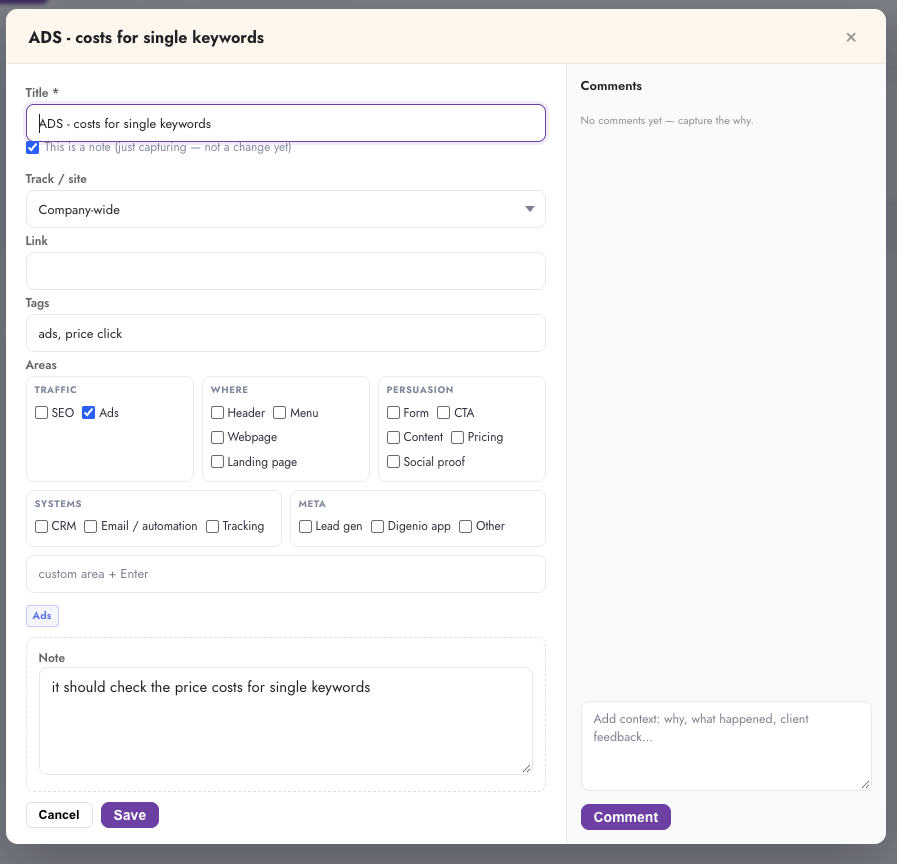
SmartChange capture form in Digenio AI v2: title, note-not-change flag, track selector, link, tags, area checkboxes for Traffic Where Persuasion Systems Meta, and comments
1

One card, thirty seconds

The capture form: a title, a flag for “this is a note — not a change yet”, the track it belongs to, a link, tags, and the area taxonomy — Traffic, Where, Persuasion, Systems, Meta. Comments capture the why while it's fresh.

  • Note vs change — capture half-formed ideas safely
  • Areas built for marketing, not engineering tickets
  • Comments become institutional memory
Run it on a board
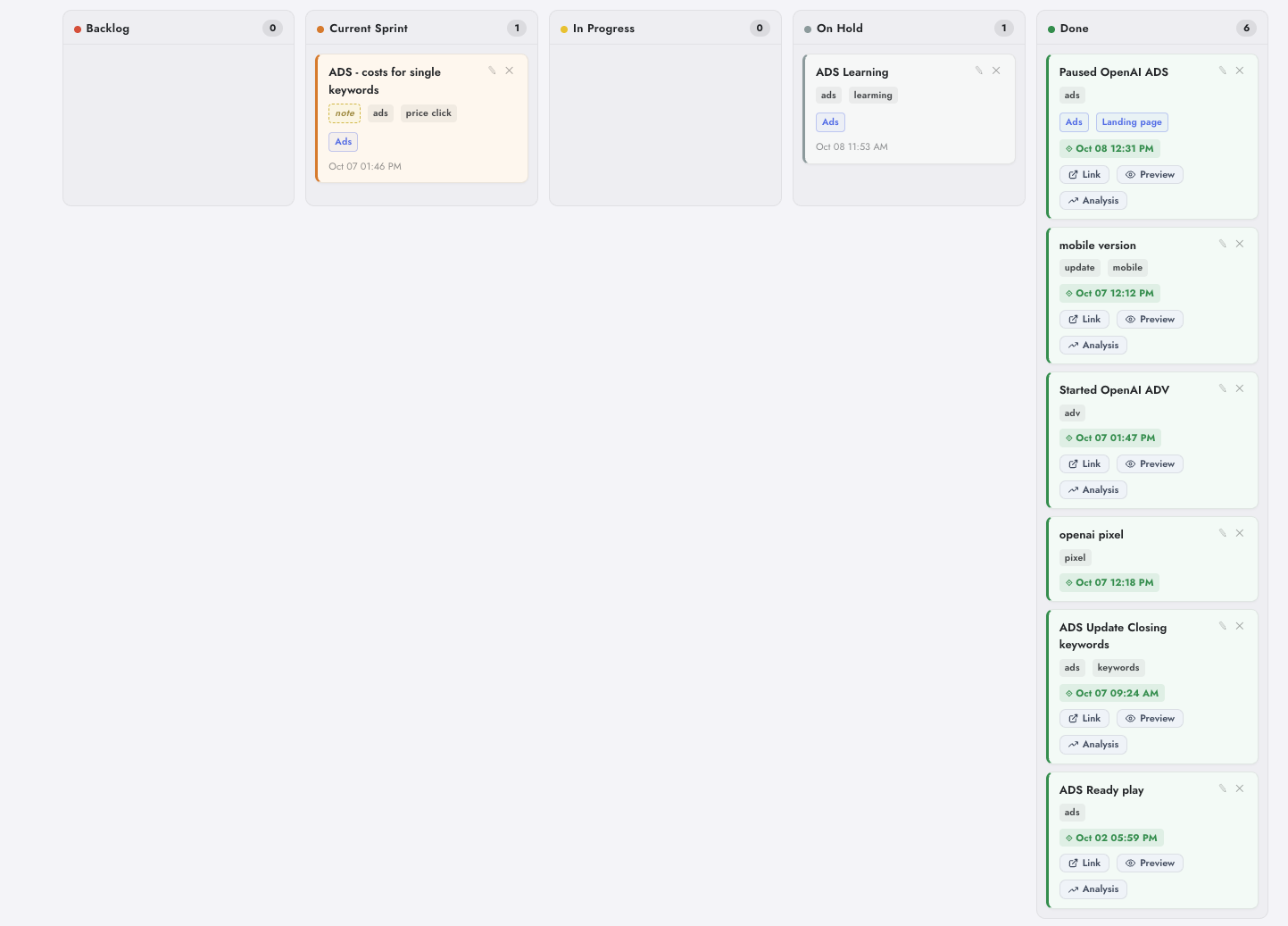
SmartChange pipeline board in Digenio AI v2: Backlog, Current Sprint, In Progress, On Hold and Done columns with counts, tags, timestamps and per-card Link Preview Analysis actions
2

From note to Done, on one board

Backlog, Current Sprint, In Progress, On Hold, Done — with live counts per column and every card carrying its dates and tags. Each card links out: open the page, preview it, or jump straight to its analysis.

  • Five stages, zero ceremony
  • Per-card Link, Preview and Analysis actions
  • Dates and tags stay attached for the charts
Pinned where you look
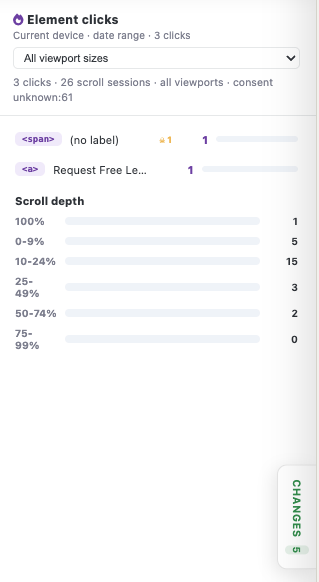
Element clicks and scroll depth panel in Digenio AI v2 page analysis with the purple CHANGES 5 button linking to the change history
3

Your analytics now knows what you did

This is the page-analysis view — element clicks and scroll depth — with the purple CHANGES button sitting right next to the data. Open it and your change history overlays the numbers.

  • Changes live inside page analysis
  • Element clicks & scroll depth, same screen
  • The loop closes without leaving the page
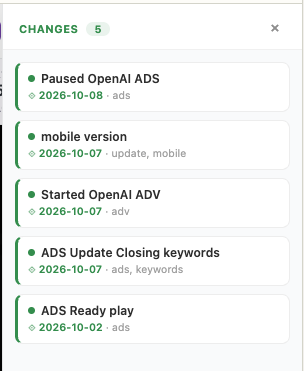
Changes list panel in Digenio AI v2: five dated and tagged changes with green status dots
4

Every change, dated and tagged

The changes panel: what changed, when, and with which tags — the history that turns “why did traffic move?” into a ten-second answer instead of an archaeology dig.

  • Green dots for shipped changes
  • Dates matter more than memories
  • Opens from any analysis view
Know your rhythm
SmartChange KPI cards in Digenio AI v2: Total Changes 8, Implemented 6 at 75%, In Flight, Median Cycle Time
5

The board talks in numbers

Total changes, implemented count and rate, in-flight work, median cycle time — the four numbers that say how healthy your shipping actually is, straight off the board.

  • Totals & implementation rate, live
  • Median cycle time, idea → Done
  • Zero manual tracking
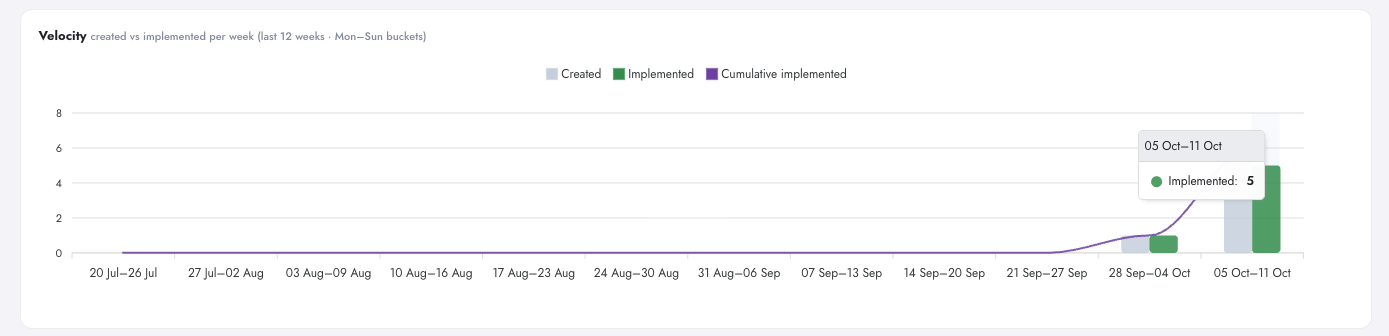
SmartChange velocity chart in Digenio AI v2: changes shipped over recent weeks
6

How fast you ship

Velocity over recent weeks — the shipping rhythm that renewal conversations and capacity plans are built on. Spikes and droughts, visible.

  • Weekly shipping rhythm
  • Spikes and droughts visible
  • No spreadsheet required
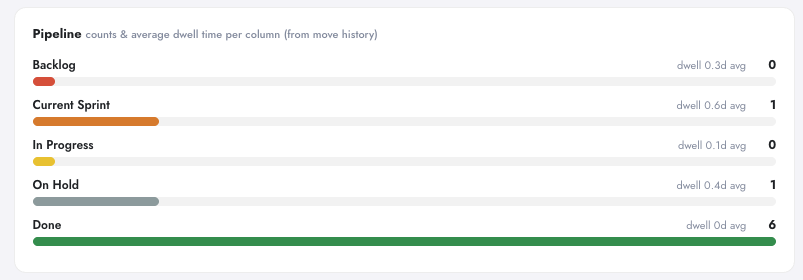
SmartChange pipeline dwell bars in Digenio AI v2: how long changes wait in each board stage
7

See where changes wait

Dwell bars show how long changes sit in each stage. The stuck stage is usually the story — now you can see it without asking anyone.

  • Dwell time per stage
  • Spot the bottleneck instantly
  • Measured automatically
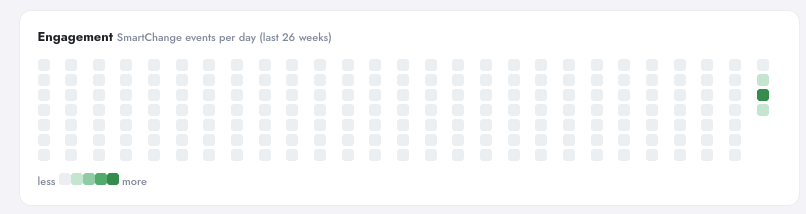
SmartChange engagement heatmap in Digenio AI v2: week-by-week change activity
8

Your shipping calendar

Week-by-week engagement — when the team was actually shipping. Quiet weeks stand out, busy sprints speak for themselves.

  • 26 weeks at a glance
  • Quiet weeks stand out
  • Context for your traffic charts
Manage the flow
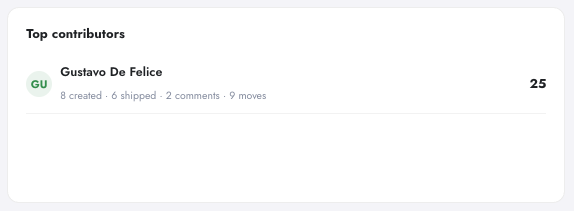
Top contributors panel in Digenio AI v2 SmartChange: who created and shipped changes, counted automatically from the board
9

Who actually ships

Top contributors, counted automatically from the board — fair credit for the team, and a useful signal for agencies running many sites.

  • Automatic — no self-reporting
  • Team-shared board, fair credit
  • Works across every tracked site
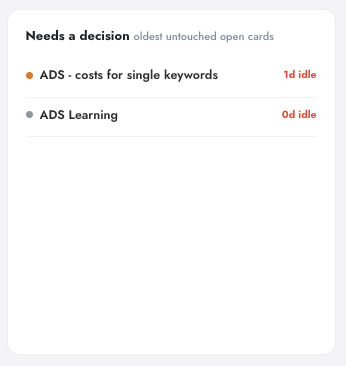
Needs a Decision panel in Digenio AI v2 SmartChange: stale change cards flagged automatically
10

Nothing rots silently

Changes that sit too long get flagged: Needs a Decision. The board surfaces its own stale cards so nothing disappears into Done — or nowhere at all.

  • Stale cards flagged automatically
  • Decisions surface themselves
  • Keeps the pipeline honest
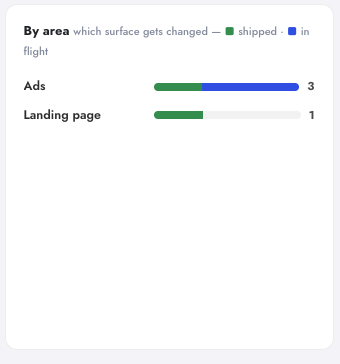
Changes by area panel in Digenio AI v2 SmartChange: split across Traffic, Where, Persuasion, Systems and Meta areas
11

Where the work lands

Changes grouped by area — Traffic, Persuasion, Systems and the rest. See whether you're actually balancing acquisition work against conversion work, or only ever tuning ads.

  • Area split at a glance
  • Balance traffic vs persuasion effort
  • Custom areas for your taxonomy
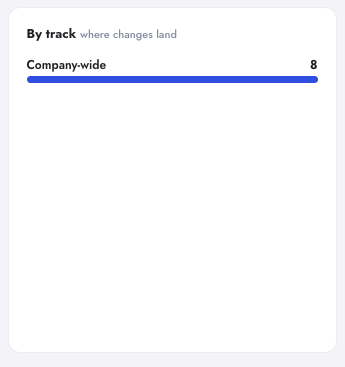
Changes by track panel in Digenio AI v2 SmartChange: company-wide initiatives and per-site tracks side by side
12

Company-wide or per site

Every track keeps its own truth — company-wide initiatives on one, individual sites on their own. Roll up for the client conversation, drill down for the work.

  • Per-site and company-wide views
  • Agency-friendly by design
  • Roll up or drill down
The honest verdict
Verdict scorecard in Digenio AI v2 SmartChange shown in its empty state — no fabricated impact scores
Second Verdict scorecard empty state in Digenio AI v2 SmartChange — verdicts arrive as change history deepens
13

The Verdict panel starts empty — on purpose

No vanity scores on day one. Verdicts about what a change actually did to your numbers arrive as your history deepens — that part is roadmap, and we say so plainly in the FAQ. What you get today is the honest ledger.

  • No fabricated impact claims
  • Verdicts earn their place over time
  • Roadmap: change-impact analysis
Built in

How fast do you ship?

SmartChange automatically tracks cycle time (idea → done), 12-week velocity, and engagement heatmap. Your shipping analytics live on the dashboard.

Median cycle time

Idea to Done, measured automatically.

12-week velocity

Your shipping rhythm, week by week.

Engagement heatmap

When the team was active, at a glance.

Stale flags

Changes that need a decision surface themselves.

For agencies & multi-site brands

The renewal conversation,
solved.

Client asks: "What did we get for the retainer?"
Answer: Open your Projects panel. "Here's your change velocity. Here are 27 shipped changes this quarter, pinned to where they landed on your charts."

Multi-site roster? One dashboard shows change activity across every client site. ROI proof no other tool offers.

Explore agencies solutions
[Projects panel multi-site dashboard]
Platform

Part of Digenio AI,
not another subscription.

SmartChange is bundled. Same multi-tenant Backbone infrastructure. First-party data. No sampling. No third-party scripts. One contract. Explore the full platform.

FAQ

Questions, answered

Hover or click the pin on your chart. The moment rail shows what changed, when, which page it affected, and who logged it. The change card has full context: description, notes, linked page, tags, areas, timestamps, and comments.
A change log is a structured, team-shared record of work done. Most analytics tools only count *what* happened (traffic, conversions). They have no machine to record what your team did about it. Manual annotations (GA-style text labels) don't scale; SaaS changelog tools track *product* releases, not marketing and website changes. SmartChange is purpose-built for marketing teams.
GA annotations are manual text labels on a chart. SmartChange is structured, team-shared, page-linked data that stamps itself onto charts and feeds shipping analytics. Multiple team members, comments, areas taxonomy, velocity tracking, and page-scoped history — all synced to one board and one data model.
Changelog tools (like Changelog.com or Roadmap) track *product* releases and feature launches. SmartChange tracks *marketing and website* changes — form redesigns, new landing pages, campaign launches, CRM tweaks — against *marketing and website* metrics (traffic, conversions, lead quality).
Yes. Back-dating lets you log historical work and stamp it with the date it actually happened. Old work lands on the timeline where it belongs, and you see the full change history immediately.
Anyone. Capture takes 30 seconds, no training needed. The board is company-shared — not per-user private. All team members see all changes. Comments stay attached to each card.
Honest answer: Automatic before/after verdicts (validated / no effect / inconclusive) and a wins log are on the roadmap. Today, SmartChange records changes pinned on charts. You see them on your metrics timeline and draw the conclusion with full context. Impact measurement (phase 2) is coming.
Yes. SmartChange uses the same multi-tenant Backbone architecture as the rest of Digenio AI. Data stays in your tenant's database. No third-party analytics, no synced snapshots, no vendor lock-in.

Stop guessing.
Start knowing.

See exactly which marketing drives revenue —
from first click to closed deal.

Free 7-day trial
GDPR ready