Lead quality · Scoring analytics · Trends

Lead Quality Dashboard: Your Scoring Engine, Audited Daily

Lead Intelligence scores every lead. The Lead Quality Dashboard watches the engine itself: volume, average score and qualified rate with period-over-period deltas, band and score distributions, human-vs-bot session splits, and signal hit rates that tell you what to fix on your site. One page, every lead, zero gut feeling.

Period-over-period deltas Six-band distribution Signal hit rates B2B & B2C modes
area.digenio.ai / lead quality / dashboard
30-day window
LQ
Lead Quality · B2C · 05/09 → 05/10/2026
Lead Fit active 16 SCORED
43.8%
Qualified rateleads in Qualified + High Priority
Leads scored 16 ▲+10 vs prev · Avg score 35.8 ▼−19.0 pts · Hot 7 · Discarded 8
SESSIONS Human, automated, bot — or honestly unknown75% human · 25% unclassifiable · 0 bots detected 12/16
TOP BAND Where the period's leads actually landedQualified 7 (44%) · Cold 1 · Disqualified 8 (50%) 44%
HIT RATES Which signals fire — and which never get the chancemulti_session 100% · demo_contact 85.7% · form_struggle 12.5% 12 rows
B2C MASK business_domain & commercial_language excludedmasked for B2C — n/a, never zero 2 signals
Small sample flagged honestly: engine live since 2026-09-10 — percentages stabilise as volume grows.
The old way

The Scoring Works. Nobody Watches the Engine.

A score you never audit is a score you eventually distrust. And "the leads feel worse this month" is not a trend line — it's a vibe.

Quality drifts, silently

A form change, a new campaign, a tracking regression — any of them can move lead quality for weeks before anyone notices. By the time sales complains, the damage is a quarter old.

Percentages without denominators

"Qualified rate is up!" From eight leads. Every KPI here carries its volume and its previous period — and small samples say so out loud instead of pretending to be statistics.

Signals that never fire

Half your intent signals can't score because the site gives them no chance — no pricing page, no demo path. Without hit rates per signal, the model looks broken when it's the site that's missing the page.

What you can do

Every Scoring KPI, With Its Denominator

Seven widgets, one question each: is the engine healthy, are the leads real, and what should we fix next — with every real screenshot further down this page.

Period health check

Leads scored, average score, qualified rate, hot leads — each with its delta against the previous period, over any date range you choose. Direction, not just level.

KPIs

Human, automated, or bot

Every conversion session is classified — human, automated, UA-bot, unclassifiable — so you know how much of your funnel is genuinely people before you celebrate a spike.

Trust

Quality over time

Average score and qualified % trended daily, with lead volume behind the lines. When quality moves, you see the day it moved — and ask what changed that day.

Trends

Band distribution

Critical, High Priority, Qualified, Cold, Really Cold, Disqualified — counts and percentages for where your leads actually land. A band with zero leads is a fact, not a failure.

Bands

Signal hit rates

Every scoring signal with its hit rate, hits, misses, n/a and average points. A signal that never fires is a site-improvement to-do hiding in your scoring model.

Diagnostics

Axis performance

Engagement, Quality, Fit, Intent, Urgency — which axes your leads satisfy and which starve, over available signals only. B2C mode masks what doesn't apply, on the card.

Axes

The six bands leads land in

Criticalcall nowtop of the queue High Prioritysame daydeadline energy Qualifiedthis weekreal and relevant Coldnurturenot yet buying Really Coldlong nurtureearly research Disqualifiedgatesjunk, reason recorded
Under the hood

From Scoring to Oversight, Four Steps

The dashboard doesn't score anything — it audits the scorer. Every number is computed from the same stored evidence the scoring cards show.

1

Scored leads flow in

Every lead scored by Lead Intelligence lands in the dataset with its axes, signals, band and phase — P1 or Final, never mixed.

2

Pick a period

Date-range filter with automatic previous-period comparison. Every KPI carries its delta — and small samples get flagged honestly instead of drawing confident lines from thin data.

3

Distributions, not anecdotes

Bands, score buckets, session classes and axis averages — computed over the period and consistent with every individual scoring card. The aggregate can't drift from the evidence.

4

Fix the site, not the model

Signal hit rates show which signals never fire. Add the pricing page, fix the form, publish the demo path — then watch axis performance respond on the same chart.

Honest samples: the dashboard tells you when it's early. With 16 scored leads it says so — "engine live since 2026-09-10, percentages will stabilise as volume grows" — and every percentage carries its count, so nobody steers the quarter on a rounding error.
Inside the product

Real Screens, Real Answers

Every widget below is a live screenshot from the v2 Lead Quality dashboard — no mockups. The product UI ships in English and Italian, and every number traces back to the scoring cards on the leads themselves.
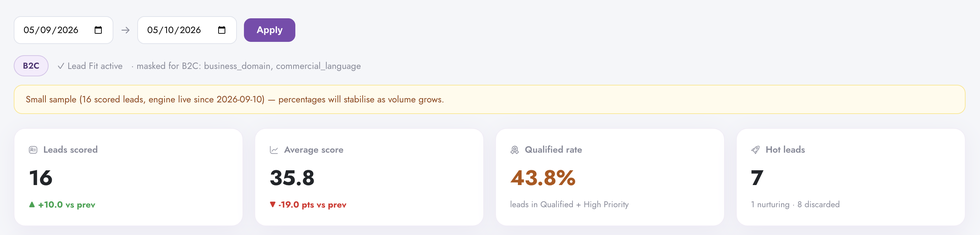
The health check
Lead Quality KPI summary in Digenio AI v2: leads scored 16, average score 35.8, qualified rate 43.8%, hot leads 7 with previous-period deltas
1

Four numbers that start every meeting

Leads scored, average score, qualified rate, hot leads — each with its delta against the previous period. 16 scored (+10), average 35.8 (−19.0 pts), qualified rate 43.8% with its definition printed underneath, hot leads 7 with 1 nurturing and 8 discarded. Pick any date range; the comparison is automatic.

  • Period-over-period deltas on every card — direction, not just level
  • Qualified rate defines itself: leads in Qualified + High Priority
  • Hot leads split into nurturing and discarded — nothing hides
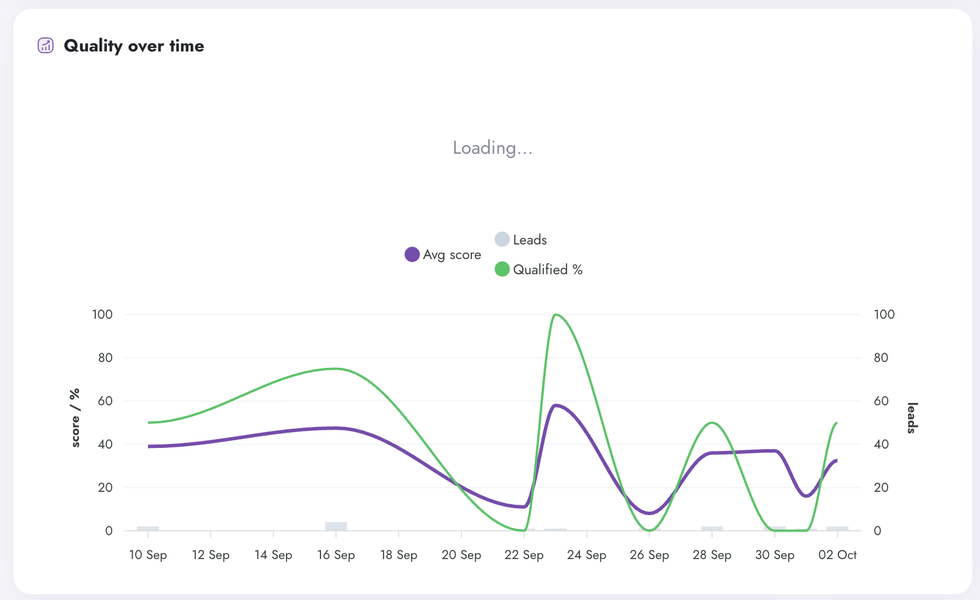
Quality over time chart in Digenio AI v2: average score and qualified percentage lines against lead volume bars
2

The trend line that answers "are leads getting worse?"

Average score and qualified % as daily lines, lead volume as bars behind them — dual axes, one timeline. Here both lines peak around 22–24 September, dip on the 26th, and recover into October. Visible, dated, discussable — the day quality moved is the day you ask what changed.

  • Average score and qualified % on one timeline
  • Lead volume behind the lines — context for every swing
  • Daily grain: trends you can correlate with campaigns

Know your leads
Session behavior in Digenio AI v2: stacked bar of human 75 percent, automated 0, bot 0, unclassifiable 25 percent
3

Humans, bots, and the honest unknown

Every conversion session is classified: human, automated, UA-bot, unclassifiable, or no form telemetry. This period: 12 human sessions (75%), 4 unclassifiable (25%), zero automated, zero bots. The unknowns are reported as unknown — never silently counted as people to make the funnel look better.

  • Automated and bot traffic separated from human before you celebrate
  • "Unclassifiable" reported honestly instead of guessed
  • A clean denominator for every conversion metric downstream
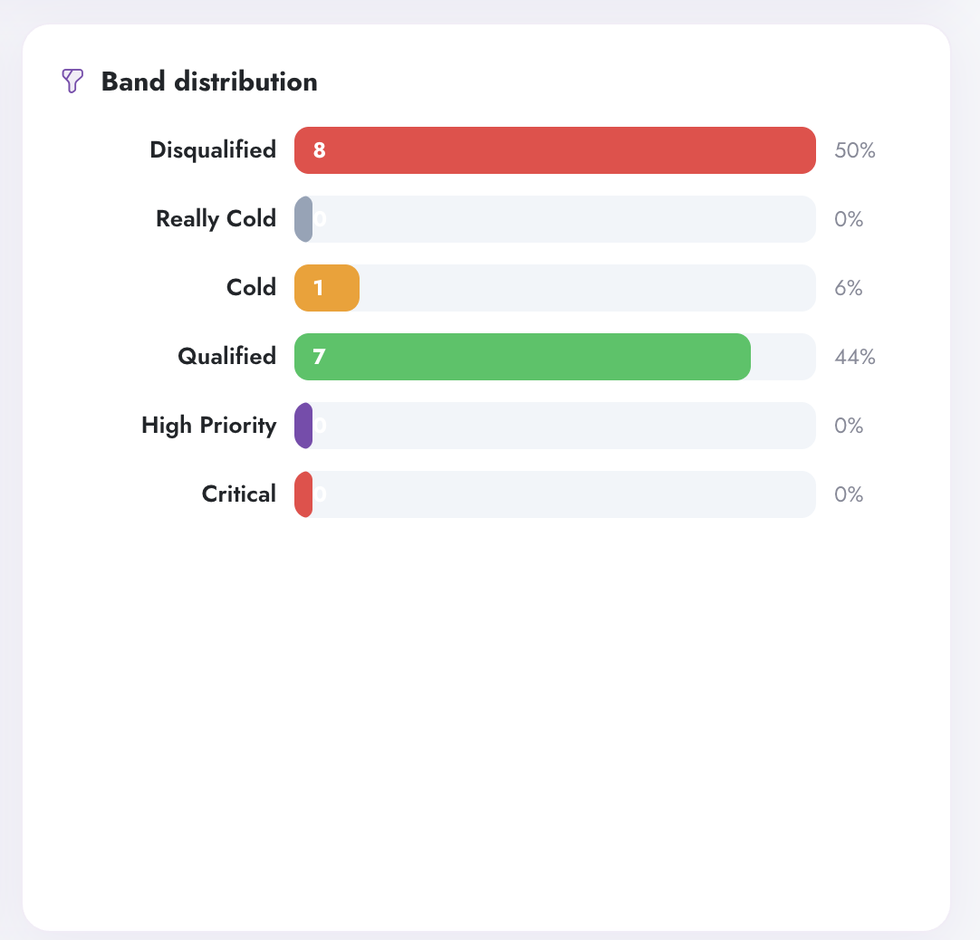
Band distribution in Digenio AI v2: Disqualified 8 at 50 percent, Qualified 7 at 44 percent, Cold 1 at 6 percent
4

Where your leads actually land

The six bands with counts and percentages: Disqualified 8 (50%), Cold 1 (6%), Qualified 7 (44%) — and zero in Really Cold, High Priority and Critical. Half the period disqualified means the gates are working, not that the business is dying. Zero High Priority is a fact about your market this month, not a failure of the model.

  • Six bands, counts and percentages, no aggregation games
  • Disqualified share = gate activity, visible at a glance
  • Empty bands stay on the chart — absence is information
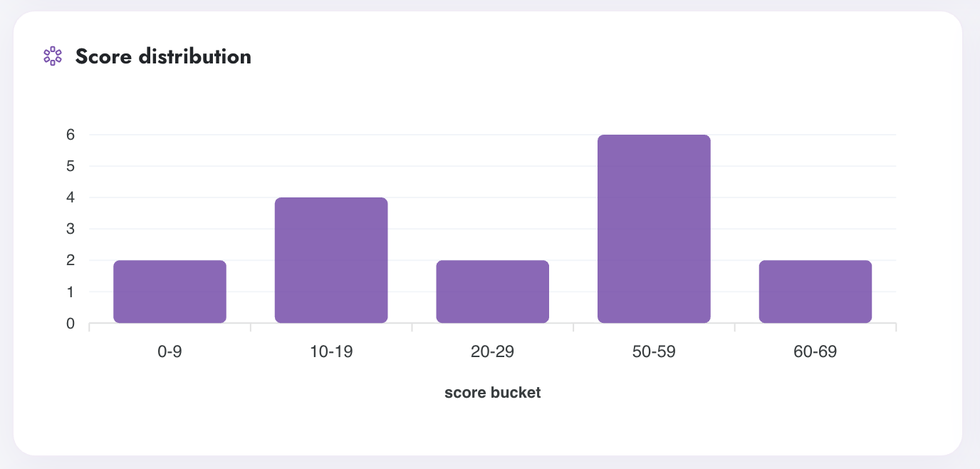
Score distribution histogram in Digenio AI v2: leads per score bucket from 0-9 to 60-69
5

The shape of your lead pool

Leads bucketed by raw score: 2 in the single digits, 4 in the teens, 2 in the twenties — then a gap — and 6 at 50–59, 2 at 60–69. That bimodal shape is the system working: junk scores low and dies at the gates, real buyers cluster high, and the empty middle is exactly your nurture conversation.

  • Raw scores, not bands — see the spread inside each band
  • The gap in the middle is the nurture question, visualised
  • Buckets align with the bands printed on the scoring cards
Diagnose the model
Signal hit rates table in Digenio AI v2: hit rate bars per signal with hits, misses, not applicable and average points
6

What drives your scores — and what your site can improve

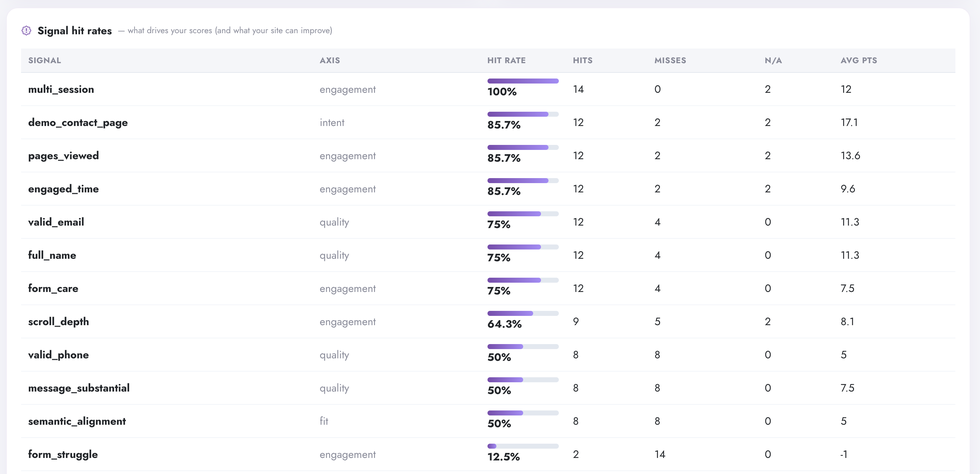
Every signal with its hit rate, hits, misses, n/a and average points: multi_session 100%, demo_contact_page 85.7%, pages_viewed 85.7%, engaged_time 85.7%, valid_email 75%, scroll_depth 64.3%, valid_phone 50%, message_substantial 50%, semantic_alignment 50% — and form_struggle at 12.5% with a negative average, friction punished by design. A signal that never fires is a site fix, not a model bug.

  • Hit rate per signal — your site-improvement backlog, ranked
  • Misses and n/a separated: a miss is fixable, n/a is not scored
  • Average points per signal — see what actually moves the score
Axis performance in Digenio AI v2: engagement 51 percent, quality 50, fit 50, intent 20, urgency 5
7

Five axes, one honest bar chart

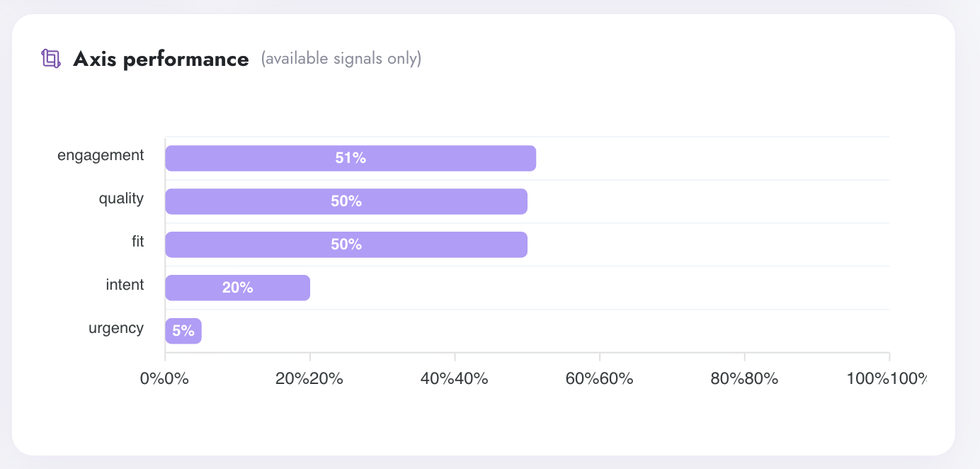
Engagement 51%, Quality 50%, Fit 50%, Intent 20%, Urgency 5% — computed over available signals only. The B2C masking is printed on the card: business_domain and commercial_language are excluded, not zeroed. Low urgency in a consumer market is a fact, not a bug — and the pill next to it says exactly which signals didn't apply.

  • Which axes your leads satisfy — and which starve
  • B2C masking declared on the card: excluded, never zero
  • Available-signals-only denominator — no phantom penalties
Data & integrations

One Pipeline: Scored Leads to Oversight

Sources
  • Lead Intelligence — axes, signals, bands, phases
  • Form telemetry — session classification per conversion
  • Your ICP profile & B2B/B2C mode
  • Consent state per lead
Aggregation engine
  • Period rollups with previous-period deltas
  • Small-sample detection, flagged on the card
  • Signal-level hit / miss / n-a accounting
  • Axes renormalized over available signals
Surfaces
  • This dashboard — KPIs, trends, distributions
  • Lead tables + scoring cards, same evidence
  • Dashboards — funnels, channels, real-time
  • CRM dispatch — band + action ride along
FAQ

Questions, Answered

Lead Intelligence scores each lead — the scoring card explains one person. The Lead Quality Dashboard aggregates all of them: trends, distributions, session classes and signal hit rates. Same stored evidence, zoomed out from the lead to the engine.
Because honesty beats confidence. With few scored leads since the engine went live, the dashboard prints the count and a plain warning — percentages will stabilise as volume grows — instead of letting a 43.8% qualified rate masquerade as a stable statistic. Every percentage carries its denominator.
Consumer leads can't have a business domain or B2B commercial language — so those signals are excluded (n/a) rather than scored as zero, and the dashboard says so on the card. Axis performance is computed over available signals only, so a B2C lead pool isn't punished for not being B2B.
A conversion session where the form telemetry is missing or too thin to classify as human, automated or bot. It is reported as unknown — never silently counted as human to flatter the numbers, and never discarded. When telemetry improves, those sessions reclassify automatically.
A signal with a low hit rate is usually a missing opportunity on the site: pricing-page-viewed can't fire if there is no pricing page; message_substantial can't fire if the form never asks. Hit rates turn your scoring model into a ranked site-improvement backlog — add the page, watch the axis respond.
Yes — both are computed from the same stored signal evidence. Every aggregate here drills down to the lead list behind it, and every lead opens the scoring card with the exact hits, misses and n/a states that produced the aggregate. No separate math, no drift.

Stop guessing.
Start knowing.

See exactly which marketing drives revenue —
from first click to closed deal.

Free 7-day trial
GDPR ready