Real Screens, Real Answers
Every widget below is a live screenshot from the v2 Page Analysis view — the product analyzing our own staging site, so these numbers are real dogfood, not mockups. The product UI ships in English and Italian.

Start from the page, not the dashboard
A searchable picker with every tracked page, ranked by traffic, each showing views, conversions and rate inline: homepage 724 views · 2 conv · 0.3%, /resources 292, /resources/artificial-intelligence.php 124, marketing-automation.php 106, seo-geo.php 80. The homepage of this tool is literally the page you care about — everything after this filters to that one URL.
- Every page with views + conversions + rate in one list
- Search beats scrolling when you track dozens of URLs
- Ranking by traffic shows the long tail instantly
Your whole site, ranked
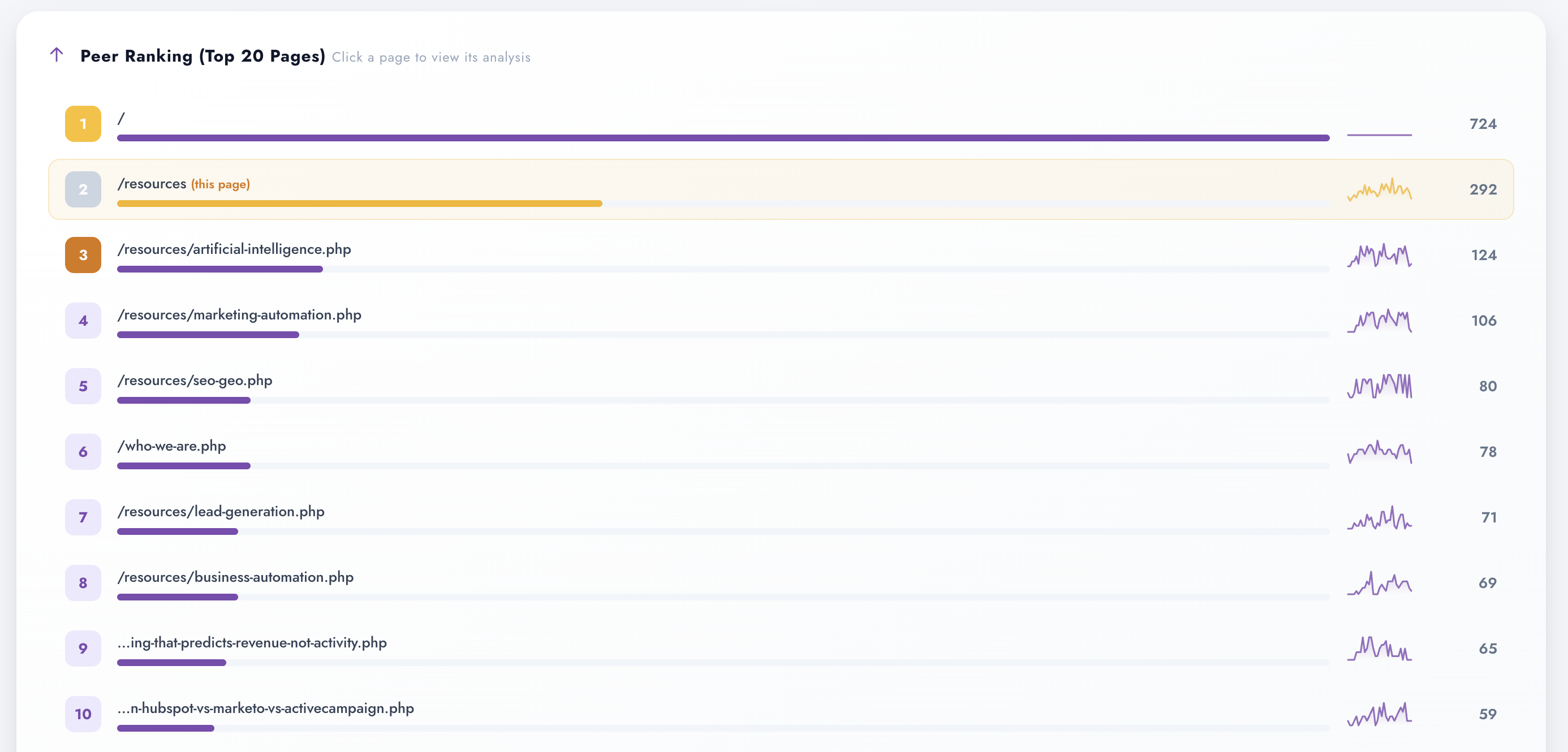
Power Ranking — the top 20 pages by traffic: / 724, /resources (this page) 292, artificial-intelligence.php 124, marketing-automation.php 106, seo-geo.php 80, who-we-are.php 78 — down to the long tail. "Click a page to view its analysis" is the whole interaction model: the ranking is the launchpad, not a dead-end report.
- Top-20 with view counts, one click to full analysis
- Long tail visible before you invest in a rewrite
- Effort allocation stops being a guess

The totals everything hangs from
Four period cards before you drill anywhere: 359 pageviews, 277 unique visitors, average time on page 1m 23s, bounce rate 57.4%. Every number further down is read against these — a 99% bounce on one page means something different when the site averages 57%.
- Pageviews, uniques, time on page, bounce — the baseline quartet
- Period-scoped: same date range as every widget below
- Site-level context so page-level numbers have meaning
Rank #2 of 20 — relative context instantly
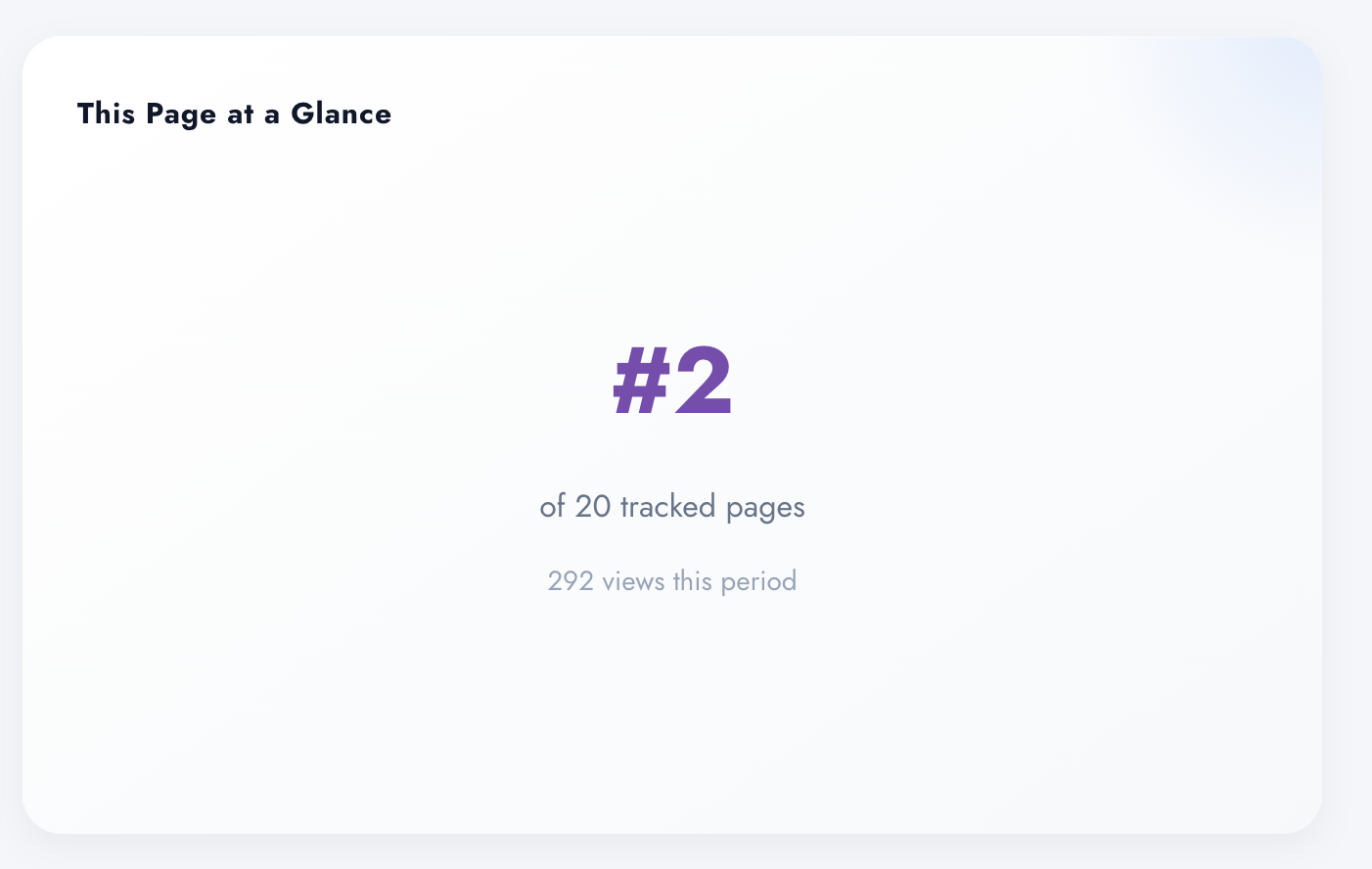
"This Page at a Glance": rank #2 of 20 tracked pages, 292 views this period. Before you look at a single chart, you know whether this URL is a workhorse or long tail — and whether a rewrite moves the needle or just polishes a corner.
- Rank among all tracked pages, not just raw counts
- Views this period, right on the card
- Effort-sizing for CRO: hero page vs vanity fix
One chart, three truths
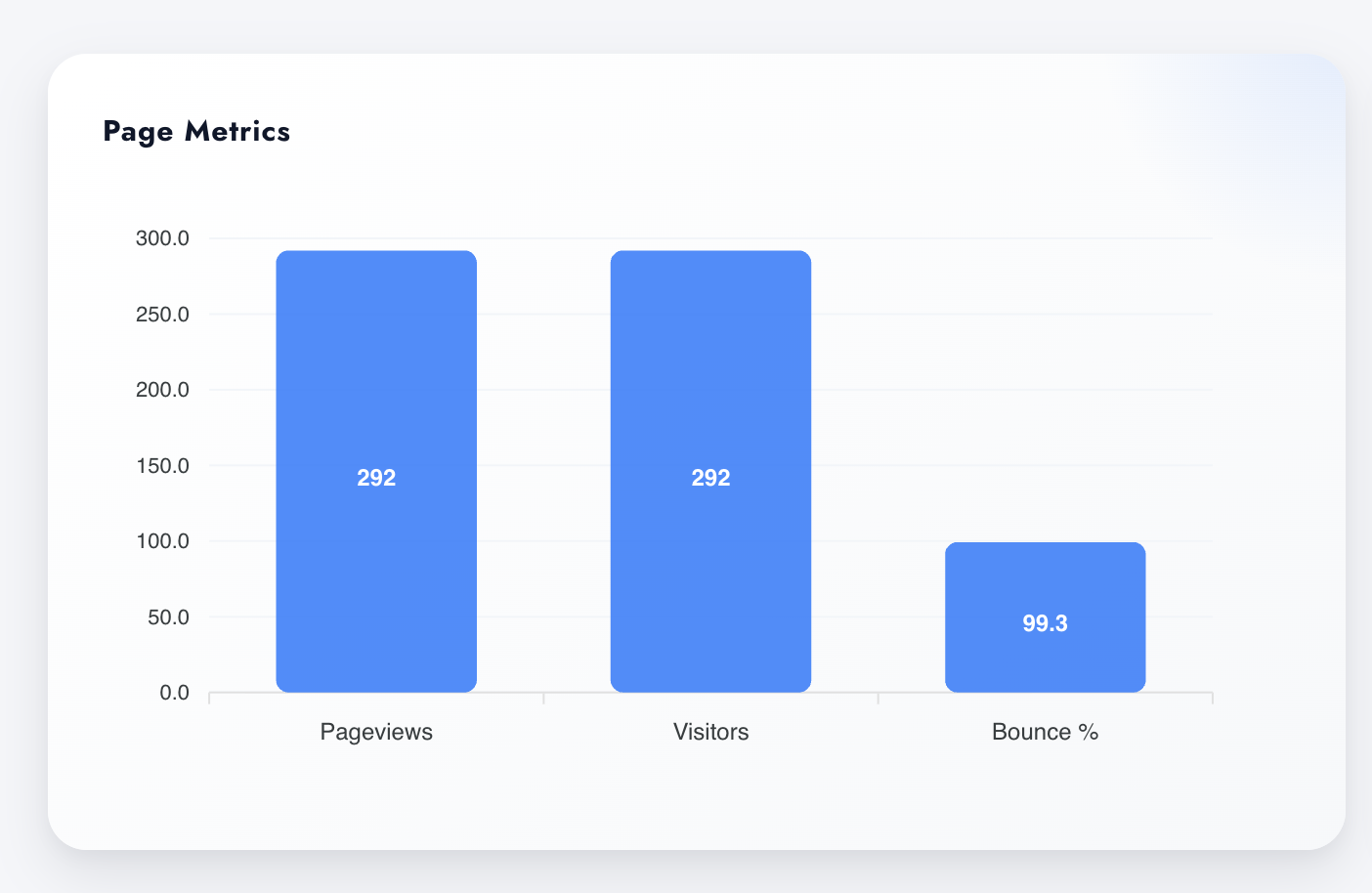
Pageviews, visitors and bounce % side by side for the chosen URL — here /resources with 292 views and 99.3% bounce. That's the classic content-hub signature: a traffic magnet that barely engages. High traffic + high bounce isn't a stats table, it's a rewrite candidate with the evidence attached.
- Views, visitors and bounce in a single comparison
- The bounce-that-survives-scale pattern, visible at a glance
- Diagnose before you rewrite — the whole point of the page
Same widget, any page — the comparison builds itself
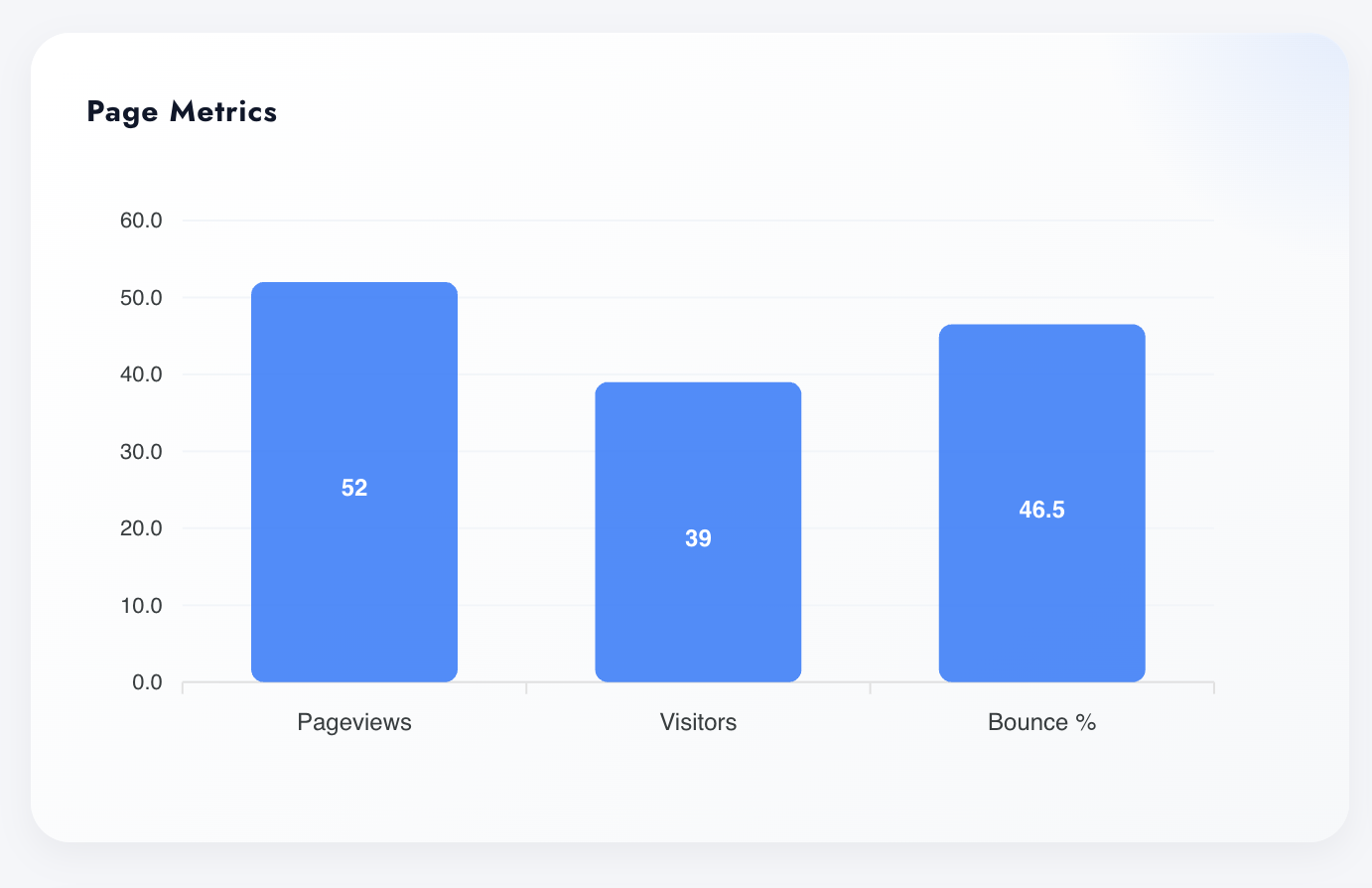
Switch URL and the same three-number verdict re-renders: this page shows 52 views, 39 visitors, 46.5% bounce. Modest traffic, honest engagement. High-traffic/high-bounce and low-traffic/low-bounce are different problems with different fixes — and now you can tell them apart in two clicks.
- Every tracked URL gets the identical three-number treatment
- Before/after redesign comparison = run it twice (roadmap-native)
- Same period, same definitions — comparable by construction
Front door or dead end?
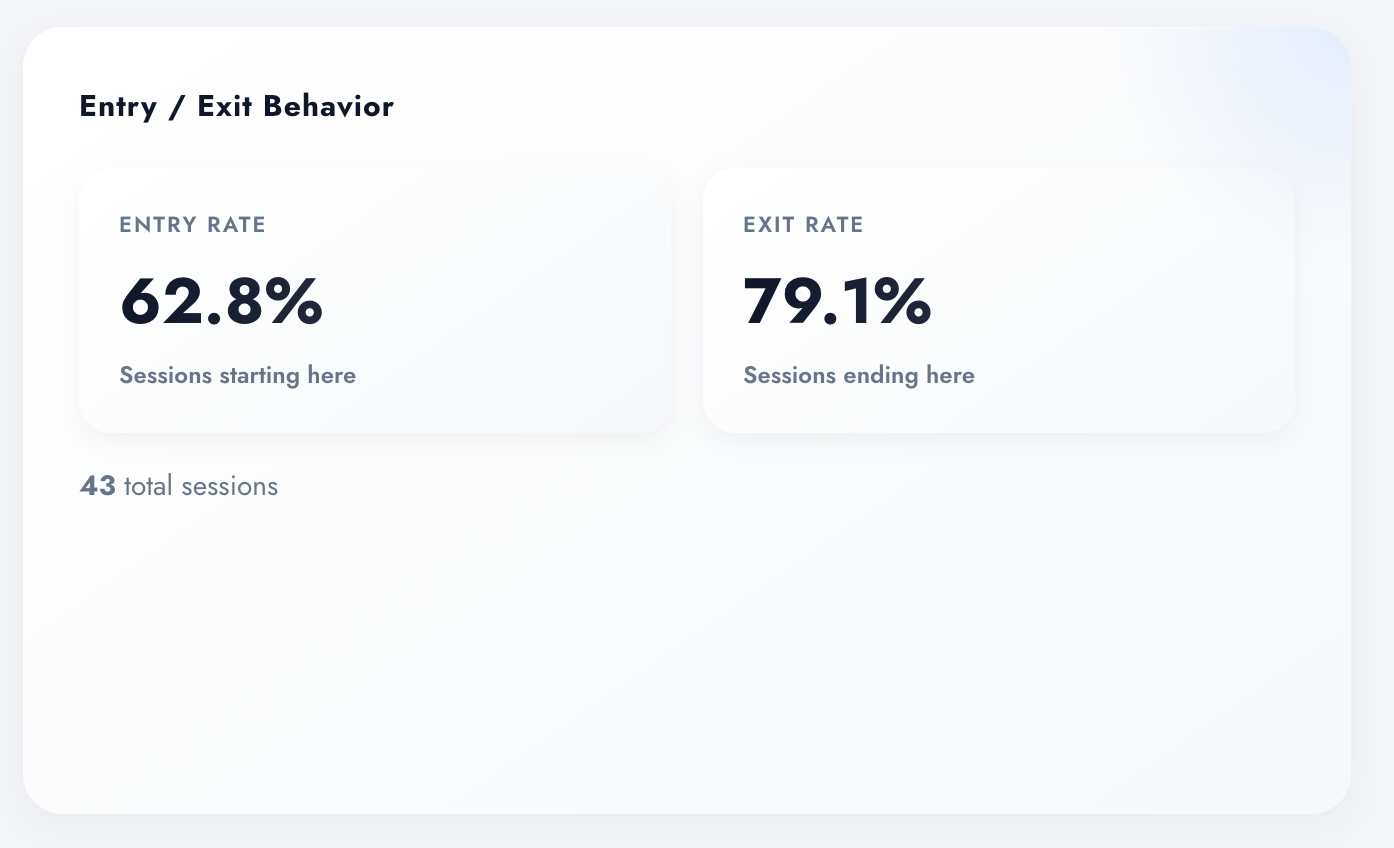
Entry Rate 62.8% — sessions that start here. Exit Rate 79.1% — sessions that end here. 43 sessions in the period. Two numbers and you know the page's role: 62.8% arrive on it (it's a front door), 79.1% leave from it (it's also the leak). Fixing a leaky front door is a very specific, very fundable project.
- Entry vs exit rate, side by side, per page
- Session counts on the card — no rate without denominator
- Landing page or leaky bucket, in two numbers
Where visitors go next
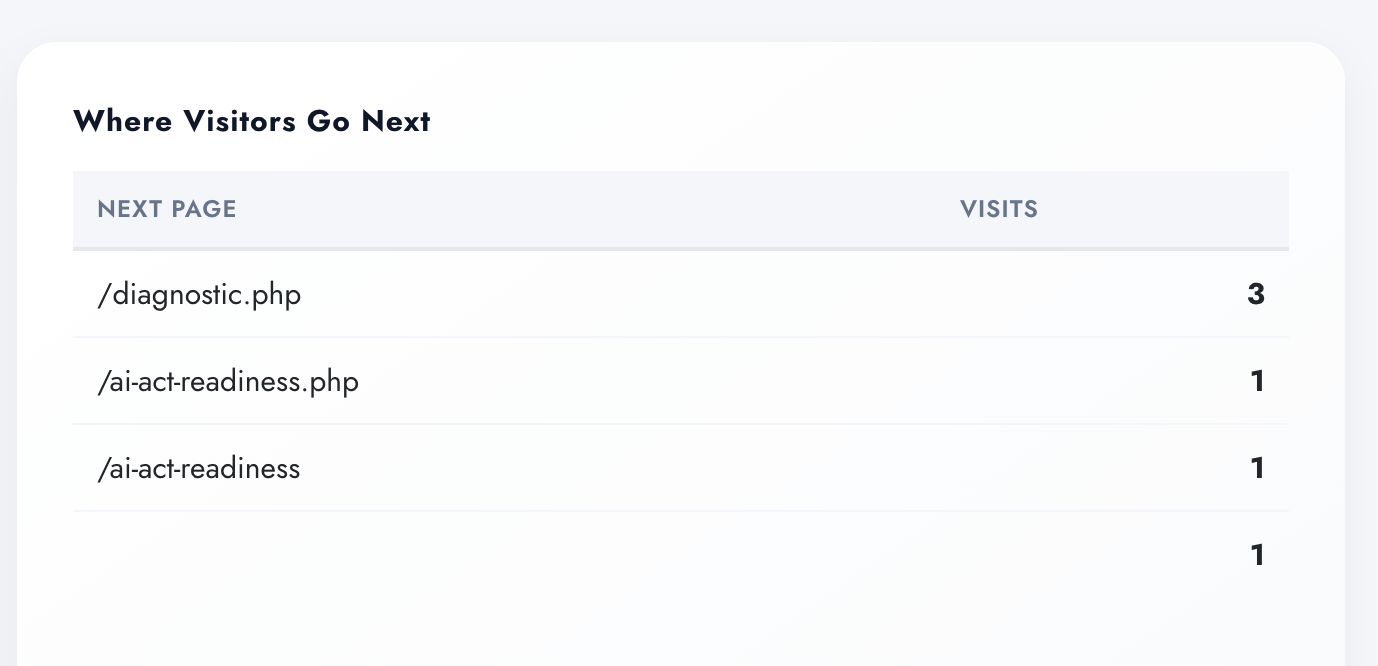
The internal journey after the page: /diagnostic.php 3 visits, /ai-act-readiness.php 1, /ai-act-readiness 1. Does your resources hub actually route people toward the money pages — or is the exit two scrolls away? This table answers it with paths, not guesses.
- Next-page table with visit counts for the chosen URL
- Validates (or kills) every "it feeds the funnel" claim
- Spots duplicate-URL splits (trailing slash, no slash) instantly
How deep they actually read
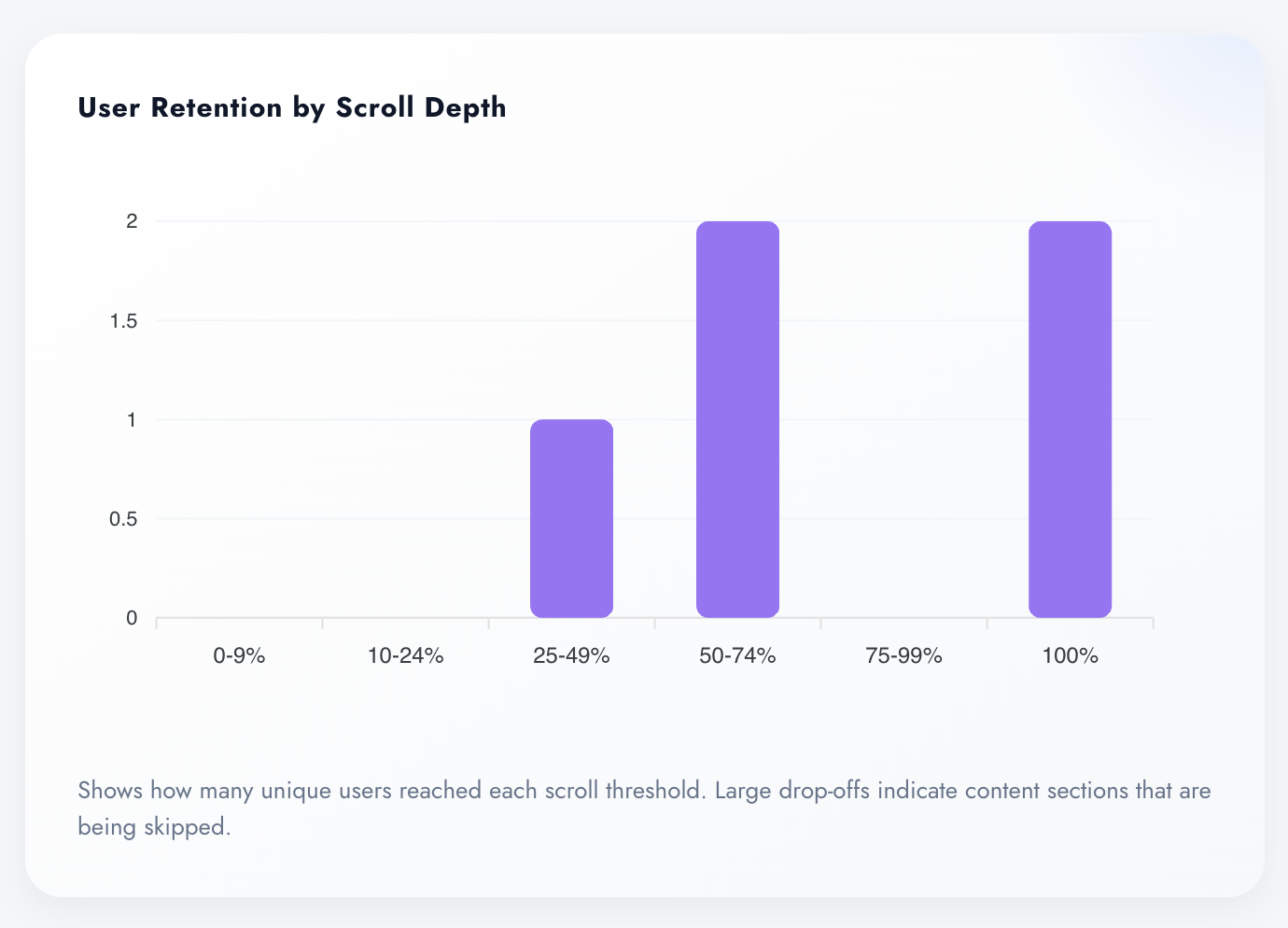
Unique users per scroll threshold — 0–9%, 10–24%, 25–49%, 50–74%, 75–99%, 100% — with the caption doing the diagnosis for you: "large drop-offs indicate content sections that are being skipped." The empty bucket is your answer to "should the CTA move higher?"
- Scroll retention in six thresholds, unique users
- Drop-offs map to content sections nobody reaches
- Layout decisions with evidence instead of taste
Where reading actually stops
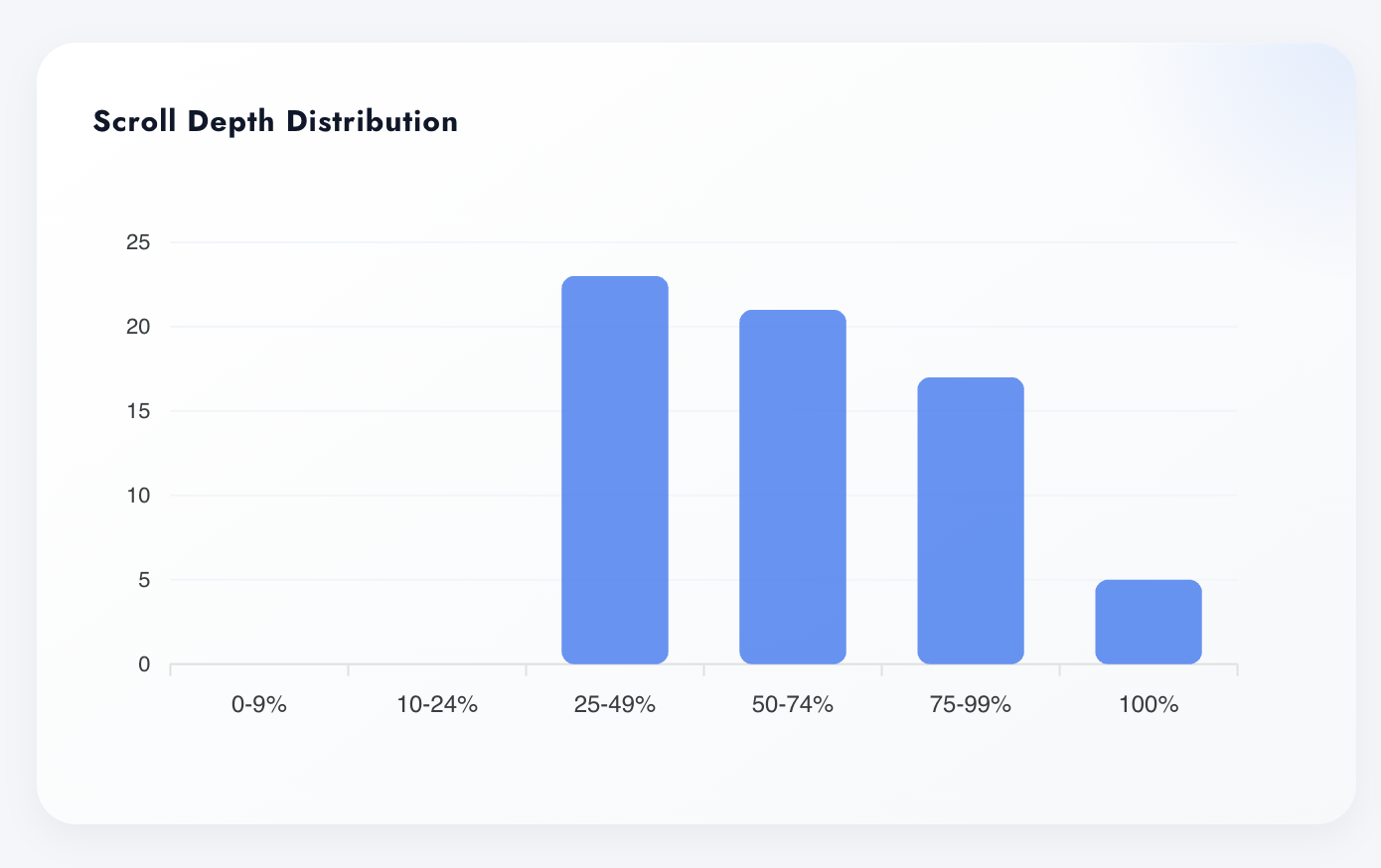
The full scroll distribution, not an average: ~23 users in the 25–49% band, ~21 at 50–74%, ~17 at 75–99%, ~5 all the way — and zero in the first two buckets. Nobody bails in the first screen here; the fade starts mid-page. That's a content problem with a location, not a vague "engagement" complaint.
- Distribution across six bands — averages hide this
- Zero early-bail buckets prove the hook works
- The fade zone shows exactly where content loses
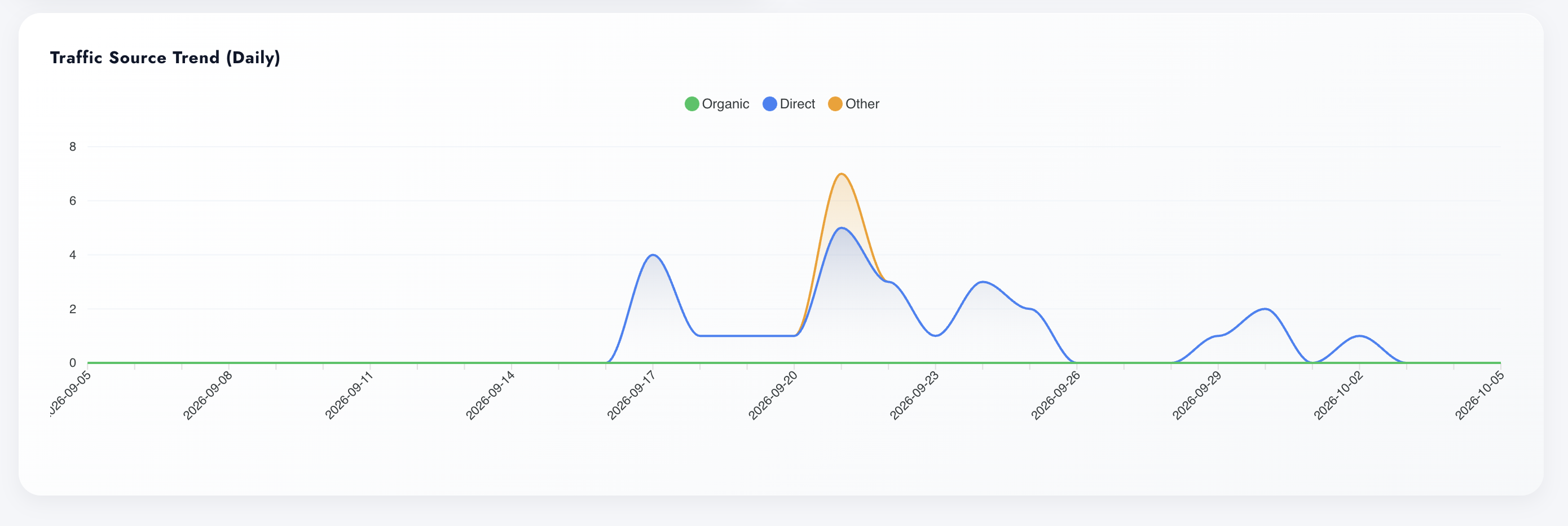
The source mix, over time
Daily lines for Organic, Direct and Other: Direct peaks on the 17th (4) and 20th (5), again on the 29th; Other spikes to 7 on the 20th — the day something got sent or shared. Static source bars tell you the mix; the trend tells you the story — and catches a decaying channel while there's still time.
- Daily grain per source, full period
- Spikes correlate with sends, shares, campaigns
- Channel decay visible before it hurts
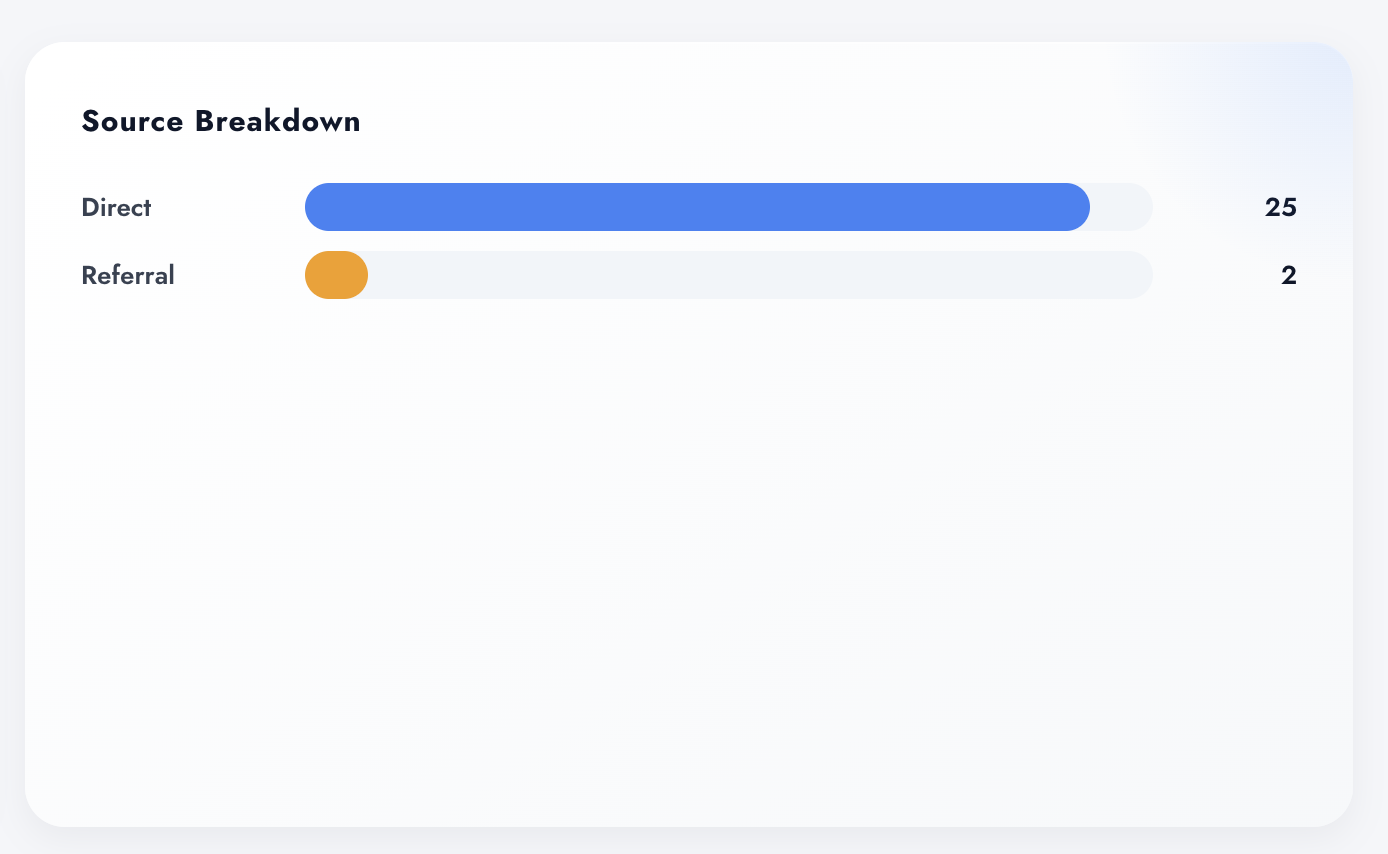
Where this page's traffic comes from
Source split for the chosen URL — here Direct 25, Referral 2 — UTM-aware, per page, not per site. A page living on referrals dies when the referrer does; a direct-heavy page is brand gravity. Per-page sources tell you which acquisition story you're actually in.
- Source/medium breakdown filtered to one URL
- UTM-aware: campaign traffic lands in the right bucket
- Concentration risk visible before it becomes a surprise
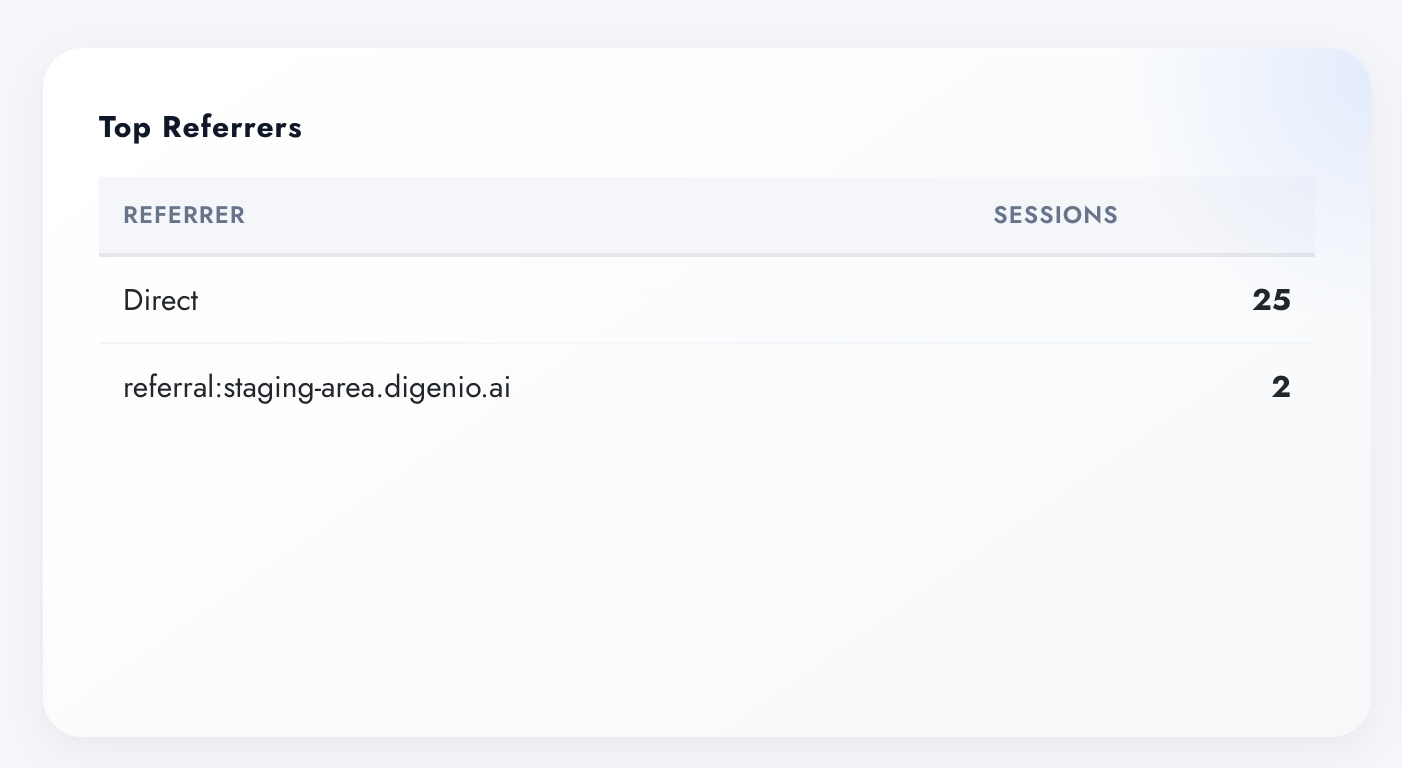
Exact referrers, not just buckets
The referrer strings themselves: Direct 25, referral:staging-area.digenio.ai 2. When someone links to you, you see who — and when a partner sends three sessions and calls it promotion, the table is the conversation. No aggregated black boxes.
- Raw referrer identity per page, with session counts
- Partner and press performance, checkable in seconds
- Drills the Source Breakdown down to named sources
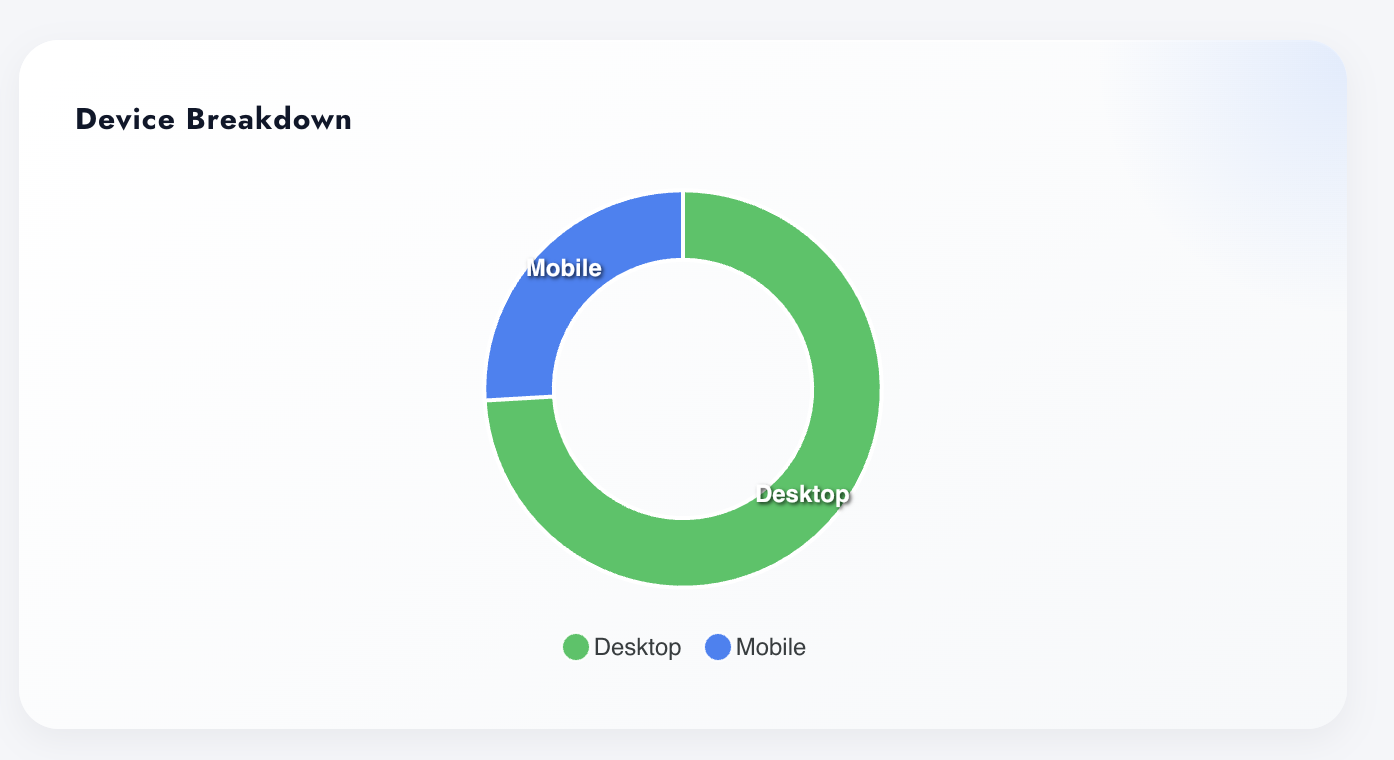
Desktop or mobile — per page, not per site
Device split for this URL: desktop leads, mobile trails. Site-level device stats hide the pages where it inverts — the landing page that's 80% mobile while your redesign review happened on a 27" monitor. Per-page devices keep the rewrite honest about who's actually reading it.
- Device donut scoped to the analyzed page
- Catches mobile-heavy pages site averages wash out
- One more axis for the rewrite brief, evidence attached
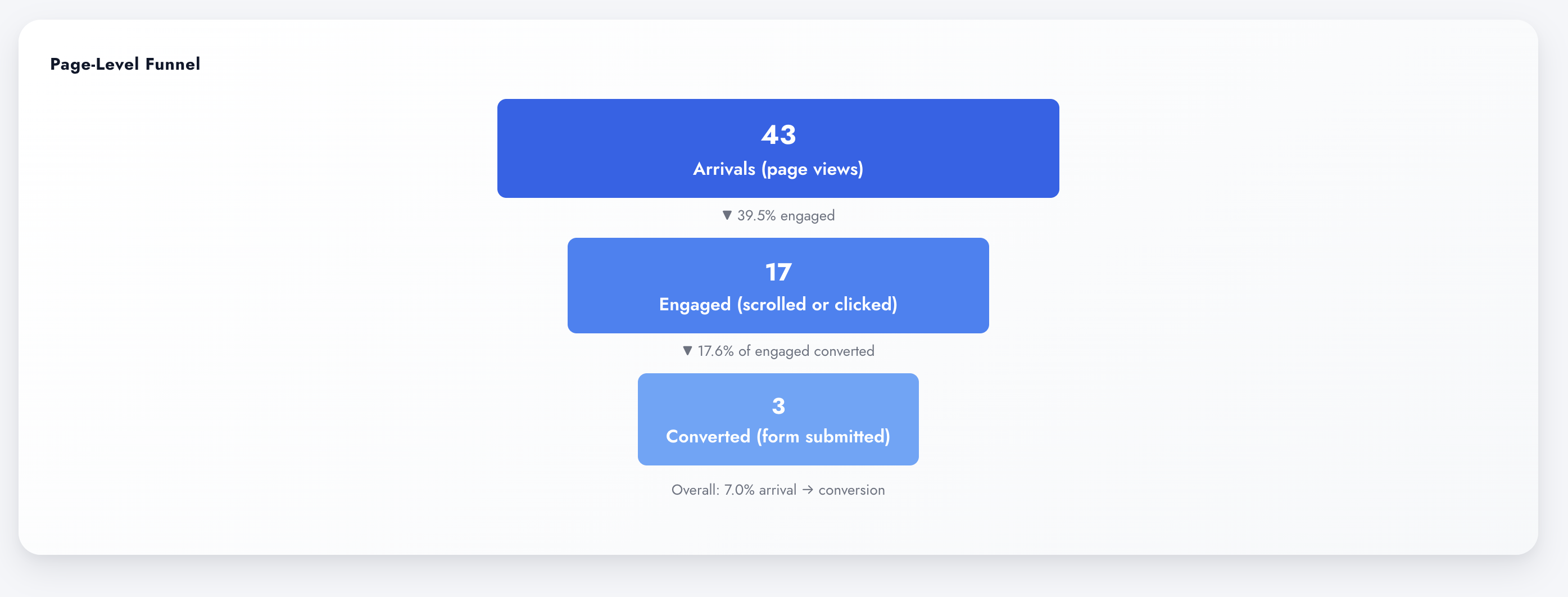
The verdict: 43 → 17 → 3
The page-level funnel: 43 arrivals, 17 engaged (scrolled or clicked — 39.5%), 3 converted (17.6% of engaged), 7.0% end-to-end. Every drop is named and quantified, so the argument isn't "the page feels weak" but "60% never engage — here's where they stop."
- Views → engaged → converted, scoped to one URL
- Step rates on every drop, end-to-end rate on the card
- The single most fundable chart in CRO
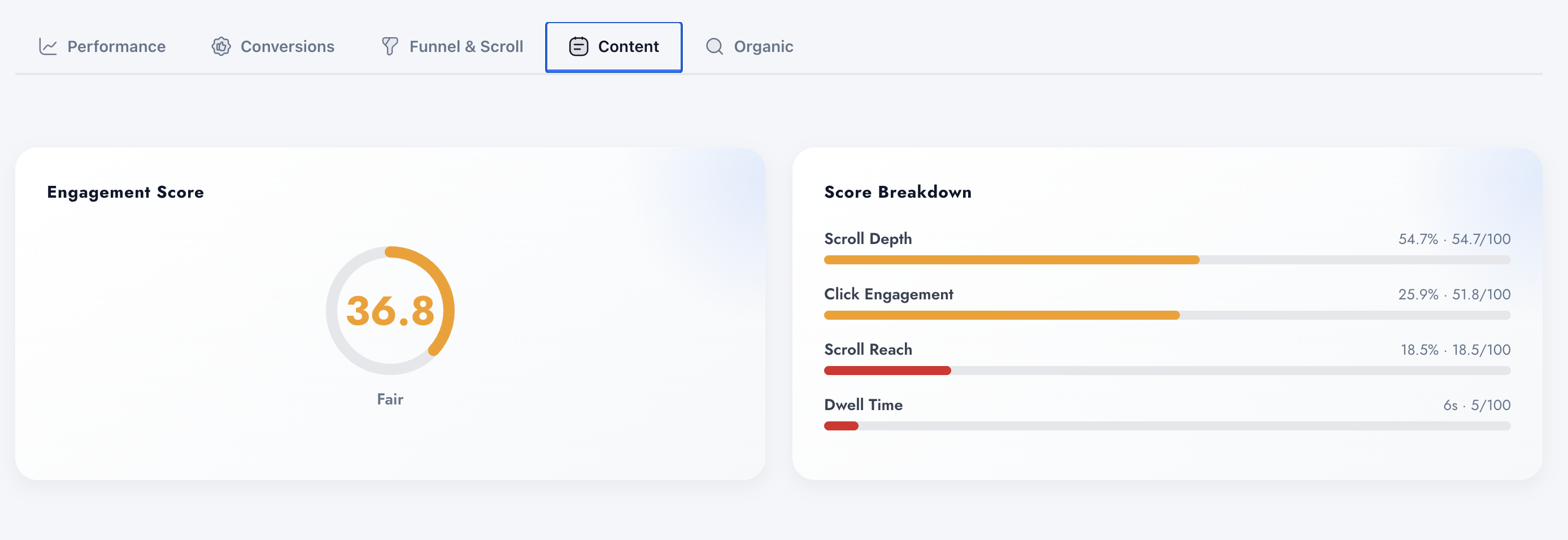
One number, four levers
Engagement Score 36.8 — "Fair" — decomposed: Scroll Depth 54.7% (54.7/100), Click Engagement 25.9% (51.8/100), Scroll Reach 18.5% (18.5/100), Dwell Time 6s (5/100). The headline tells you where the page stands; the breakdown tells you which lever to pull. Fair because they scroll but don't stay — that's a messaging problem, not a layout one.
- Headline score with a human label, not just a number
- Raw metric and normalized points, side by side
- Points you at the weakest component first
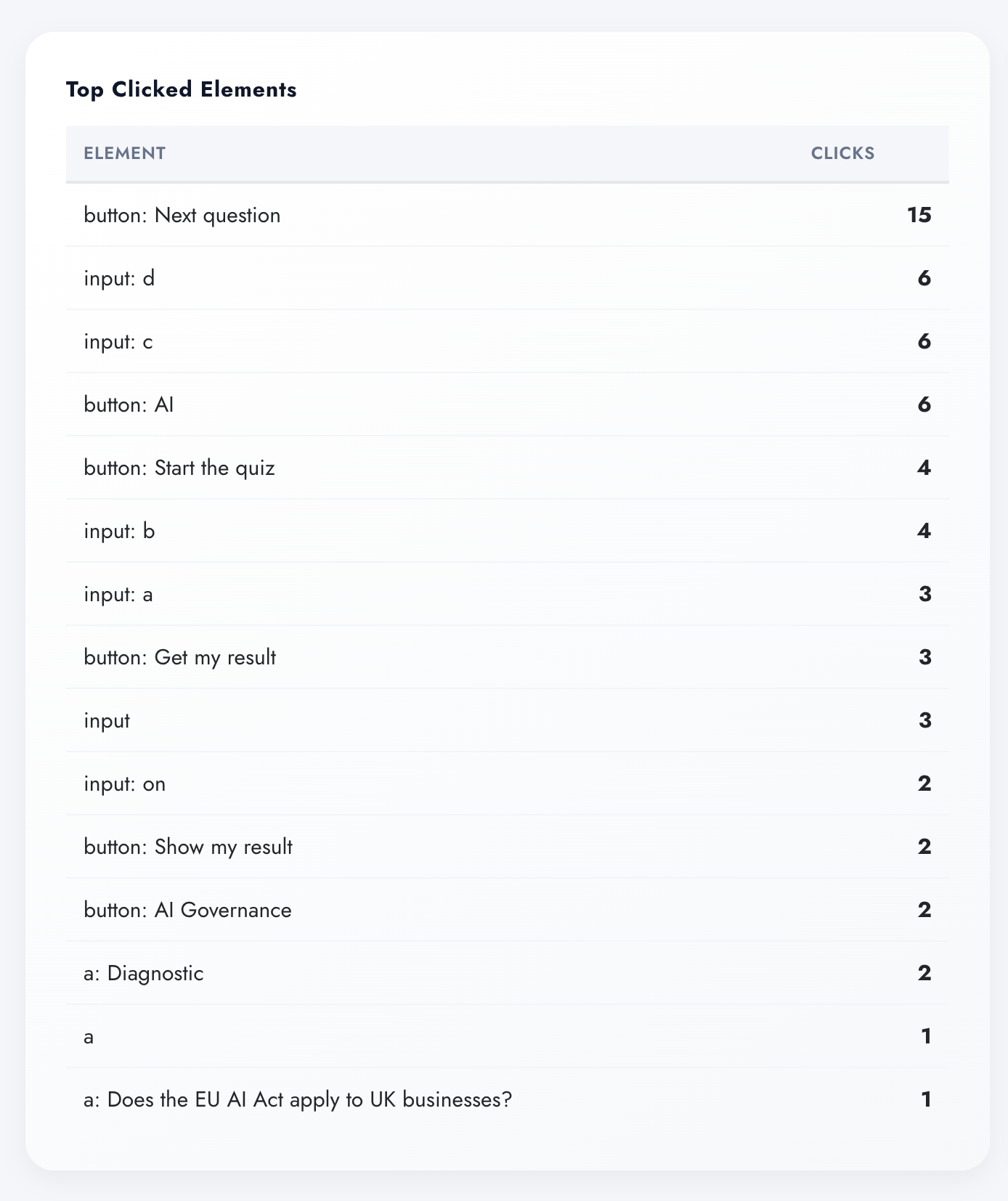
What actually gets clicked
Element-level click tracking: button "Next question" 15 clicks, inputs 6/6/4/3, "Start the quiz" 4, "Get my result" 3. The quiz's whole flow reads straight off the table — and so does its dead weight, because an element with no clicks has no row. This is heatmap-grade evidence in a table you can sort, quote and act on.
- Clicks per element, selector-precise
- Multi-step flows verify themselves off one table
- Dead UI is visible by absence — no guessing
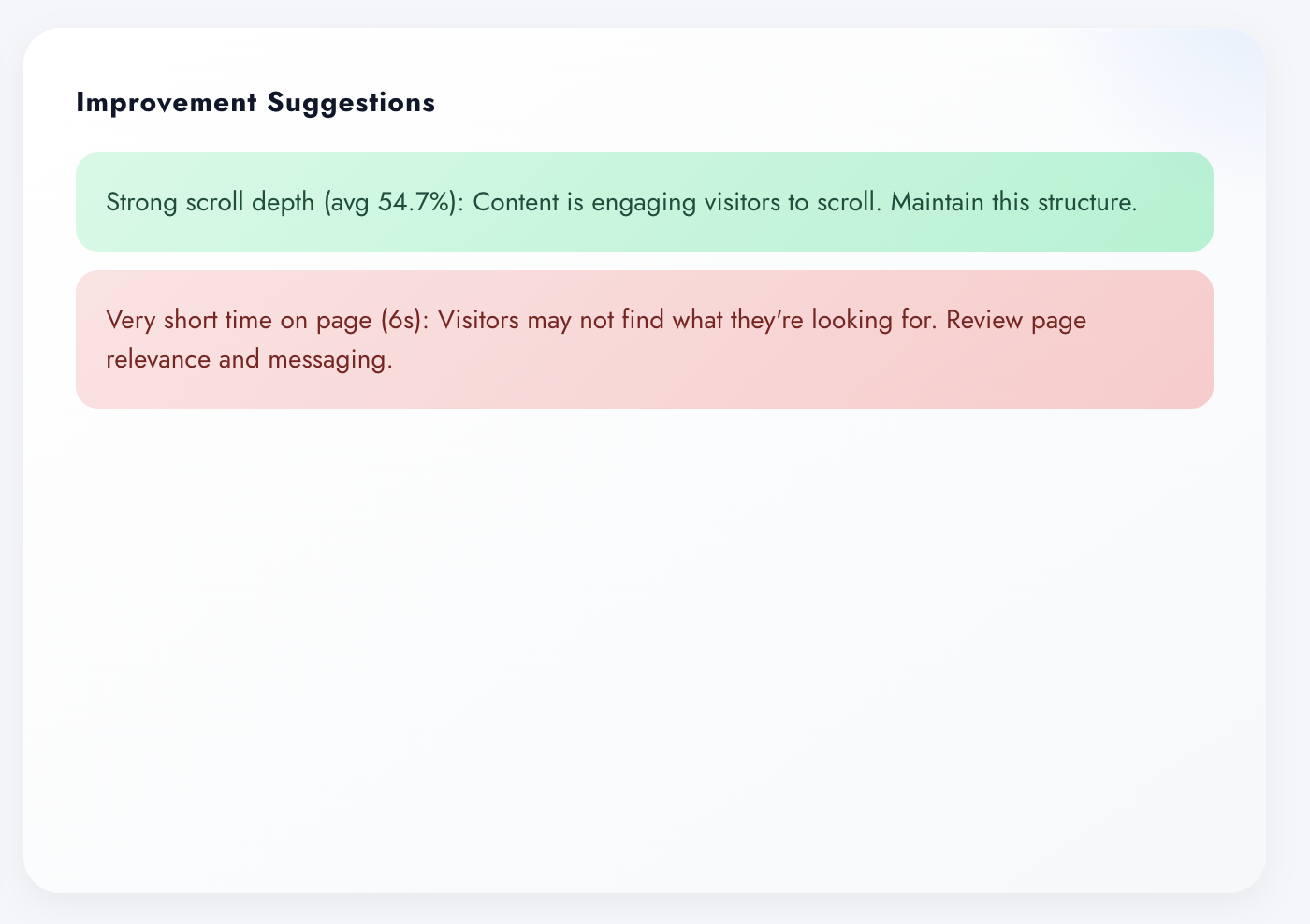
The diagnosis, written for you
Improvement Suggestions close the loop, in plain language: green — "Strong scroll depth (avg 54.7%): content is engaging visitors to scroll. Maintain this structure." Red — "Very short time on page (6s): visitors may not find what they're looking for. Review page relevance and messaging." Same numbers as the score breakdown, turned into the next action. Diagnose before you rewrite — delivered.
- Strengths to keep and fixes to make, ranked by severity
- Tied to the same metrics the widgets measured
- A rewrite brief that writes itself