Channel attribution · Product analytics

Traffic Sources — see where your visitors come from and what they're worth

Every visit, attributed to its source — Google, ads, email, referral, direct — with conversions, conversion rate and traffic quality per channel. First-party, per-visit, on your own data. No GA4, no tagging religion, no sampling.
The real thing: seven live screenshots below ↓

Per-source CVR First-touch vs last-click Untagged ad detection Bot filtering
area.digenio.ai/v2/?dash=sources_report
live · last 30 days
Visits4,281▲ 12%
Conversions137▲ 9%
CVR3.2%▼ 0.3pp
Returning31%▲ 4pp
Sources · click any row to drill into campaigns
google / organicORGANIC
1,906 4.1%
google / cpcADS · gclid
1,238 2.7%
facebook / paid_socialADS · fbclid
674 1.9%
direct / none
411 2.2%
⚠ Untagged paid detected: 63 visits arrived with a gclid but no UTM — still counted as paid via click-id.
The old way

You're Buying Traffic Blind

"We got 5,000 visits last month." Great — from where? Which of those turned into leads? Which channel quietly delivers bots? If your answer is a GA4 export and a shrug, you're paying for traffic you can't judge.

Sources without outcomes

Most reports stop at visits per channel. Without conversions and CVR per source, "traffic is up" is a vanity metric — the channel could be 100% junk and still look successful.

Untagged ad spend leaks

Ads click without UTMs more often than anyone admits. If your tool only reads UTM tags, paid traffic hides inside "direct" — and you keep funding a channel you think is organic.

Bots inflate everything

Single-page, zero-interaction visits pad your numbers and depress your CVR. Without per-source quality scoring, scrapers and crawlers look identical to customers.

What you get

Every Source, Measured

Where your traffic comes from · Visits & conversions per day · Which landing pages pull visitors in · Last-click vs first-touch · Paid coverage · Traffic quality. One report, zero configuration.

Channel attribution, per visit

Every visit is classified into ads, organic, direct, referral or email — with visits, conversions, CVR% and returning-visitor share per source × medium row, plus period-over-period deltas.

Visits & conversions per day

A daily trend chart with channel chips shows when a channel heated up or died — and whether conversions followed traffic or decoupled from it.

Landing page attribution

Top entry pages with visits, conversions and CVR — attributed to the visit that actually entered there. Click through to see which sources and campaigns feed each landing page.

Last-click vs first-touch

Conversion credit under both models, side by side — plus a divergence table listing every conversion where they disagree. The exact rows where last-click is lying to you.

Paid coverage & click-ids

gclid, fbclid and gads click-ids are detected directly from the counters layer — so untagged Google Ads or Meta traffic still shows up as paid, with per-source coverage bars.

Quality scoring & bot filtering

Engaged% vs Passive% per source — passive means one page, zero clicks, zero scroll: bot signature. Rage and dead clicks per 1,000 visits. Internal traffic excluded automatically.

How it works

From Visit to Attribution

No tag manager archaeology, no UTM police. Digenio records each visit with its own attribution fields — referrer, UTMs, click-ids, first-ever source — and the report assembles itself from your own data.

1

Every visit carries its own attribution record

The tracker stores source, utm_source, utm_medium, utm_campaign, referrer_class, click-id type (gclid/fbclid/gads), landing URL and the visitor's lifetime first-touch source — one row per navigation, in your own data shard.

2

Rows are bucketed into channels, in priority order

Ads (paid medium or click-id present) → direct → organic → referral → email → other. Click-ids win ties, which is exactly what makes untagged paid traffic impossible to miss.

3

Conversions, quality and comparisons compute automatically

Form completions mark converting visits; engagement signals (scroll, clicks, pages) score quality; the previous equal-length period is fetched for deltas. Pick a date range — the report does the rest.

4

Drill down in one click

Click a source row to open campaigns, terms and daily trends. Click a landing page to see which sources and UTMs entered there. No query builder, no export to spreadsheets.

The report

The Traffic Sources View, Widget by Widget

Every widget below is a live screenshot from ?dash=sources_report — the report analyzing our own site. Real dogfood numbers, not mockups.
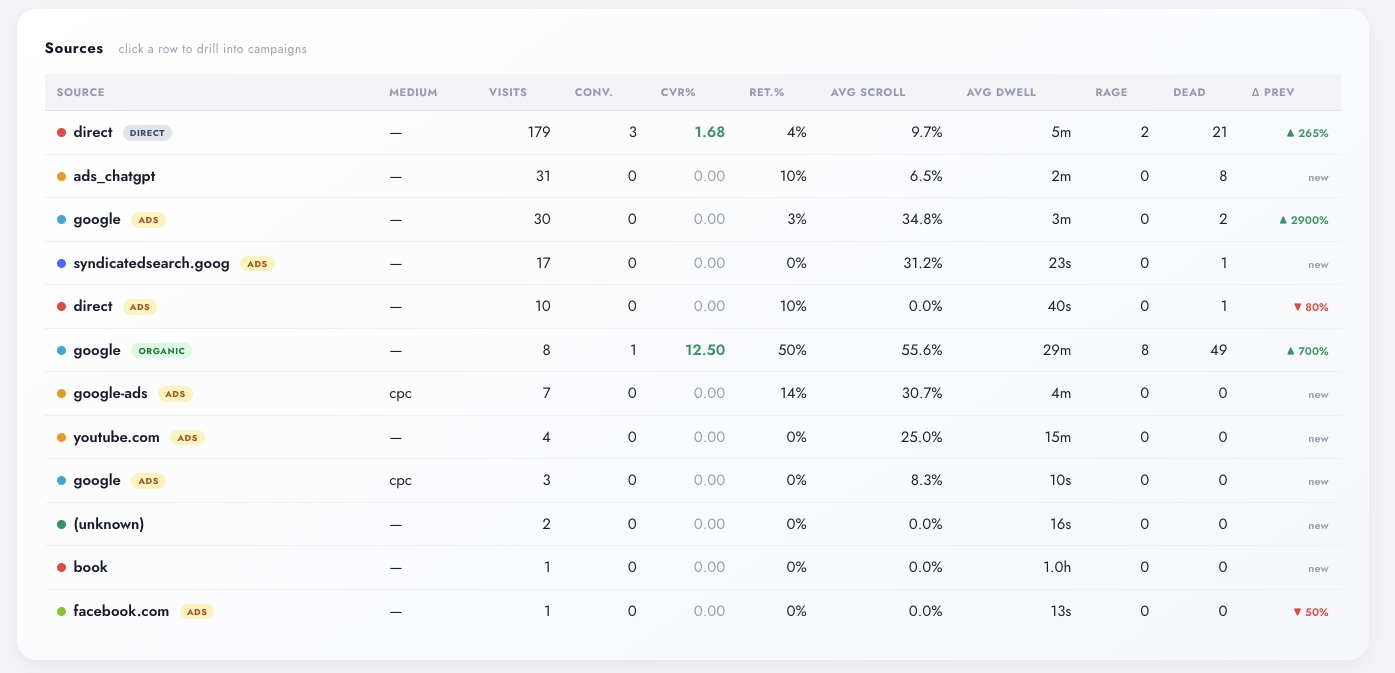
The sources table
Traffic Sources table in Digenio AI v2: one row per source and medium with visits, conversions, CVR percent, returning rate, average scroll, dwell, rage and dead clicks, plus delta versus previous period — direct 179 visits, google ads and organic, ads_chatgpt, syndicatedsearch
Live: sources × medium, last 30 days vs previous 30
1

Every source, measured

One row per source × medium: visits, conversions, CVR%, returning%, average scroll depth and dwell time, rage and dead clicks. Deltas vs the previous period are computed automatically, so you always know if a channel is heating up or dying.

  • Click any row → campaign drill-down with daily sparkline
  • Paid cells badged with gclid / fbclid / gads
  • Period-over-period delta on every metric
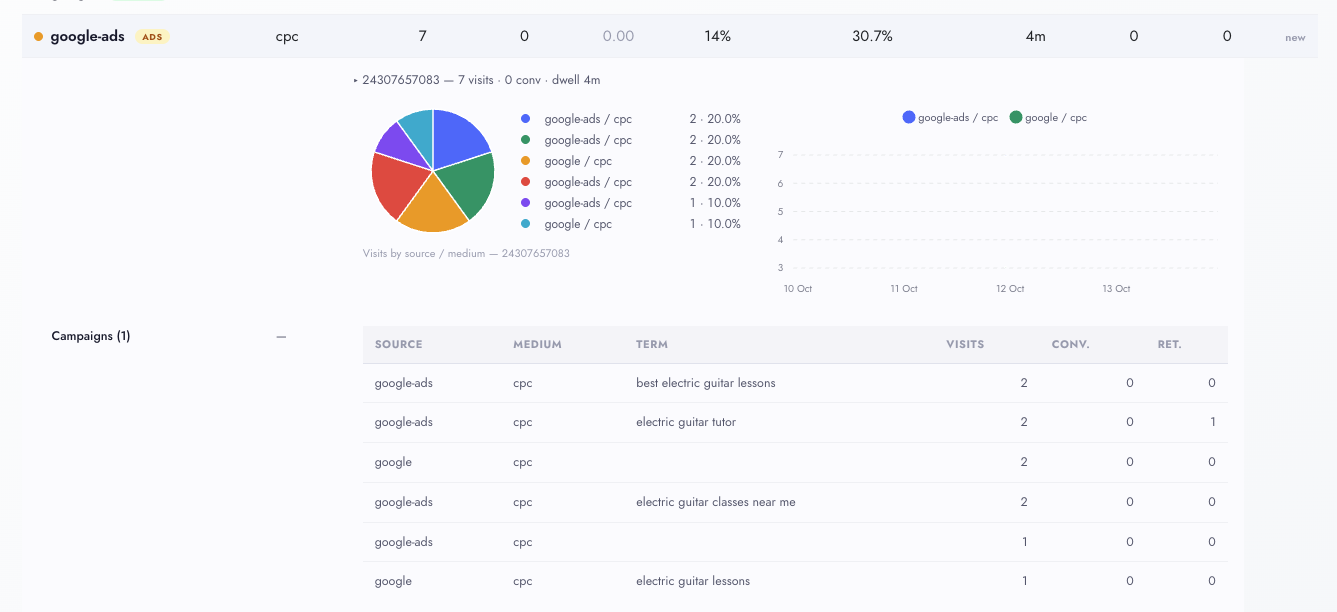
Campaign drill-down in Digenio AI v2 sources report: expanded google-ads row with campaign 24307657083, visits by source-medium donut chart, daily visits line chart and keyword-level campaign table
Live: click a row → campaign drill-down with donut + daily trend
2

Click a row, open the campaign

Expanding a source row opens its campaigns: a summary line — campaign 24307657083, 7 visits, 0 conversions, 4m dwell — a donut of visits by source/medium, and the daily trend. Below, the keyword table maps ad spend to intent: term-level visits for “electric guitar tutor”, “best electric guitar lessons”.

  • Drill-down from any source row — campaigns, terms, click-ids
  • Donut + daily line chart per campaign
  • Keyword-level visits: spend mapped to intent
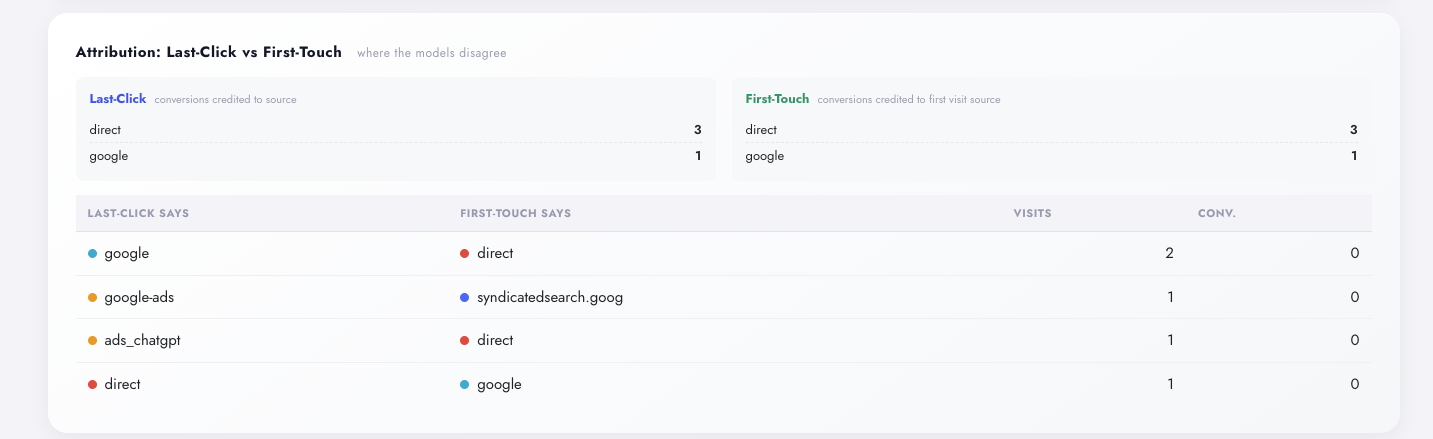
Attribution & paid detection
Attribution in Digenio AI v2: last-click versus first-touch conversion credit boxes per source and a divergence table listing visits where the two models disagree
Live: last-click vs first-touch side by side — divergence table below
3

Last-click vs first-touch — who really earned the conversion

Last-click credits the source of the converting visit. First-touch credits the source of the visitor’s first-ever visit. Digenio shows both, side by side, and the divergence table lists every conversion where the two disagree.

  • Side-by-side conversion credit per source
  • Divergence rows: where source ≠ first-touch source
  • Spot the channels that open doors vs close deals
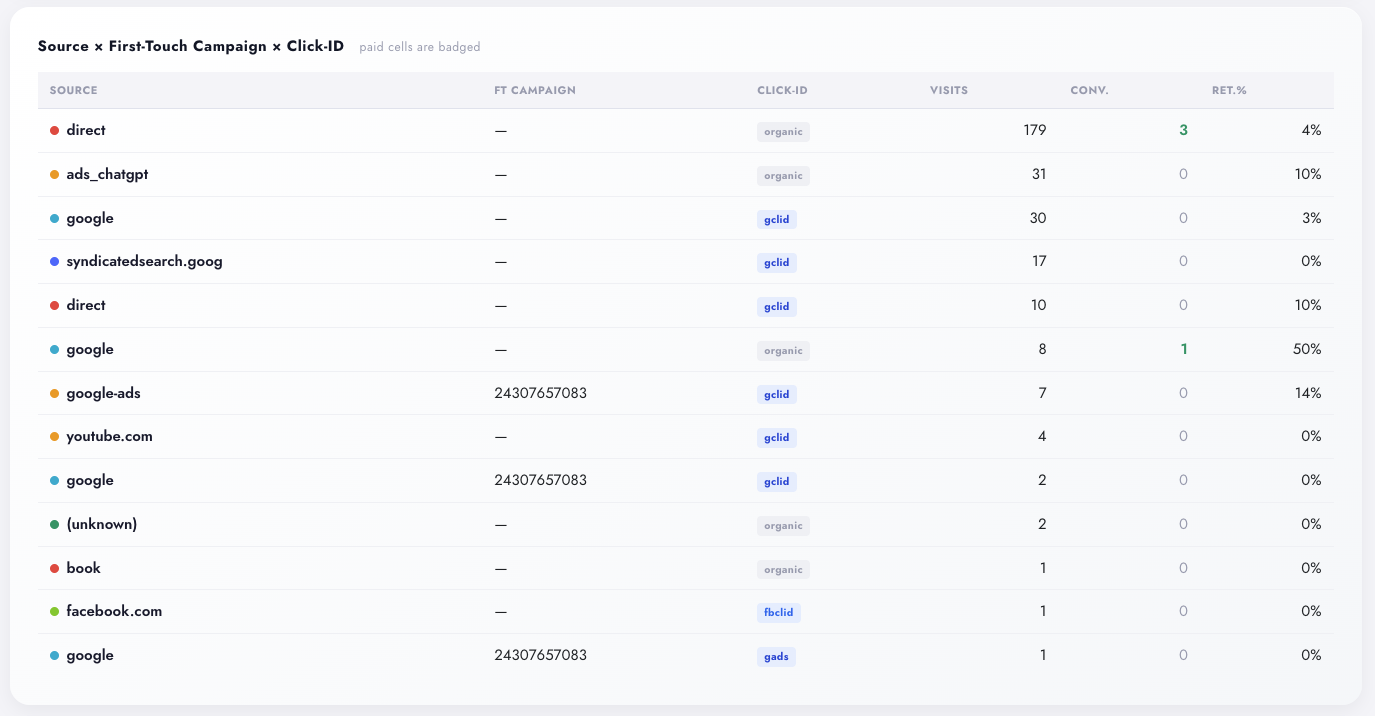
Source by first-touch campaign and click-id table in Digenio AI v2: paid visits badged gclid, gads and fbclid in blue, organic markers in gray, with visits, conversions and returning rate per row
Live: every visit’s click-id, badged — paid in blue, organic in gray
4

Paid traffic, badged at the visit level

Every visit carries its click-id — gclid, gads, fbclid — read straight from the counters layer. Paid cells are badged in blue, organic in gray, and each row links source × first-touch campaign × click-id so you can audit exactly which visits your ads paid for.

  • Click-ids from counters — no UTM tagging required
  • Paid badged blue, organic gray — per visit, not estimated
  • First-touch campaign tied to the click
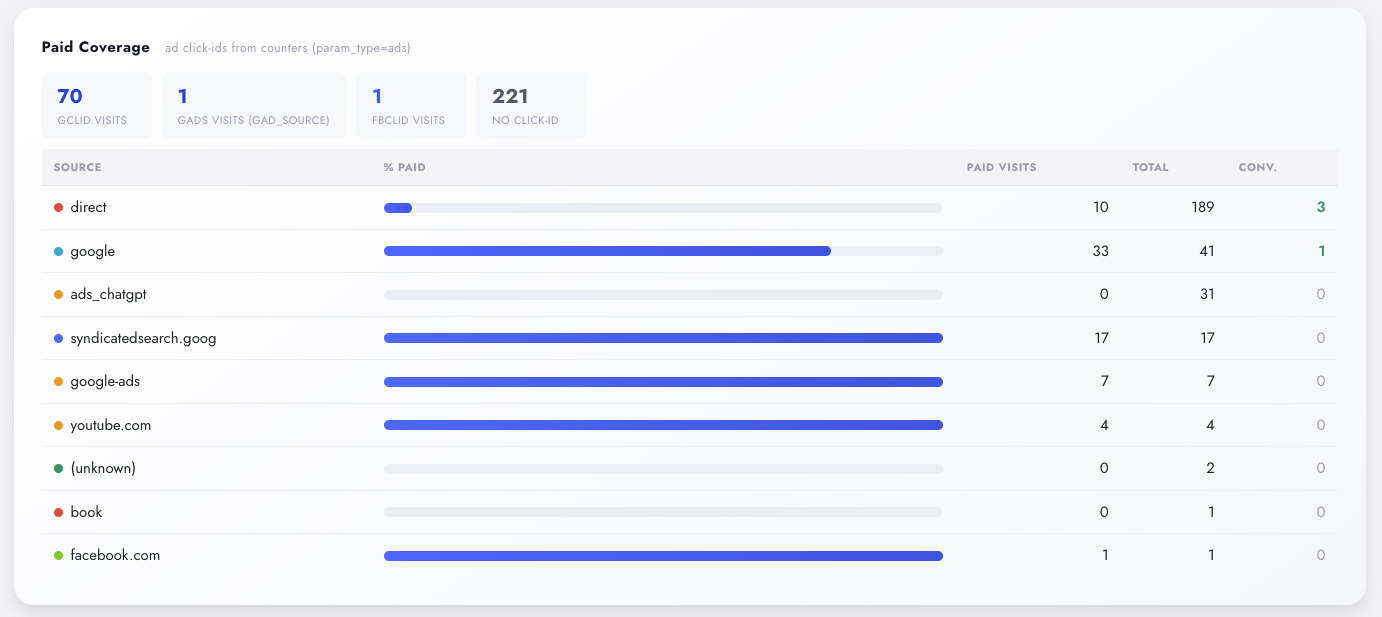
Paid coverage in Digenio AI v2: gclid, gads and fbclid visit counters with no-click-id total, and per-source percent-paid progress bars built from ad click-ids
Live: % paid per source — the untagged-ad leak, visible
5

Catch untagged paid traffic automatically

Paid traffic doesn’t always arrive tagged. Digenio detects gclid, fbclid and gads click-ids directly from the counters layer, so untagged Google Ads or Meta traffic still shows up as paid — with per-source coverage bars that make the paid share of each channel instantly visible.

  • Click-id chips per source: gclid · gads · fbclid
  • % paid per source, at a glance
  • The #1 silent budget leak, made visible
Quality & landing pages
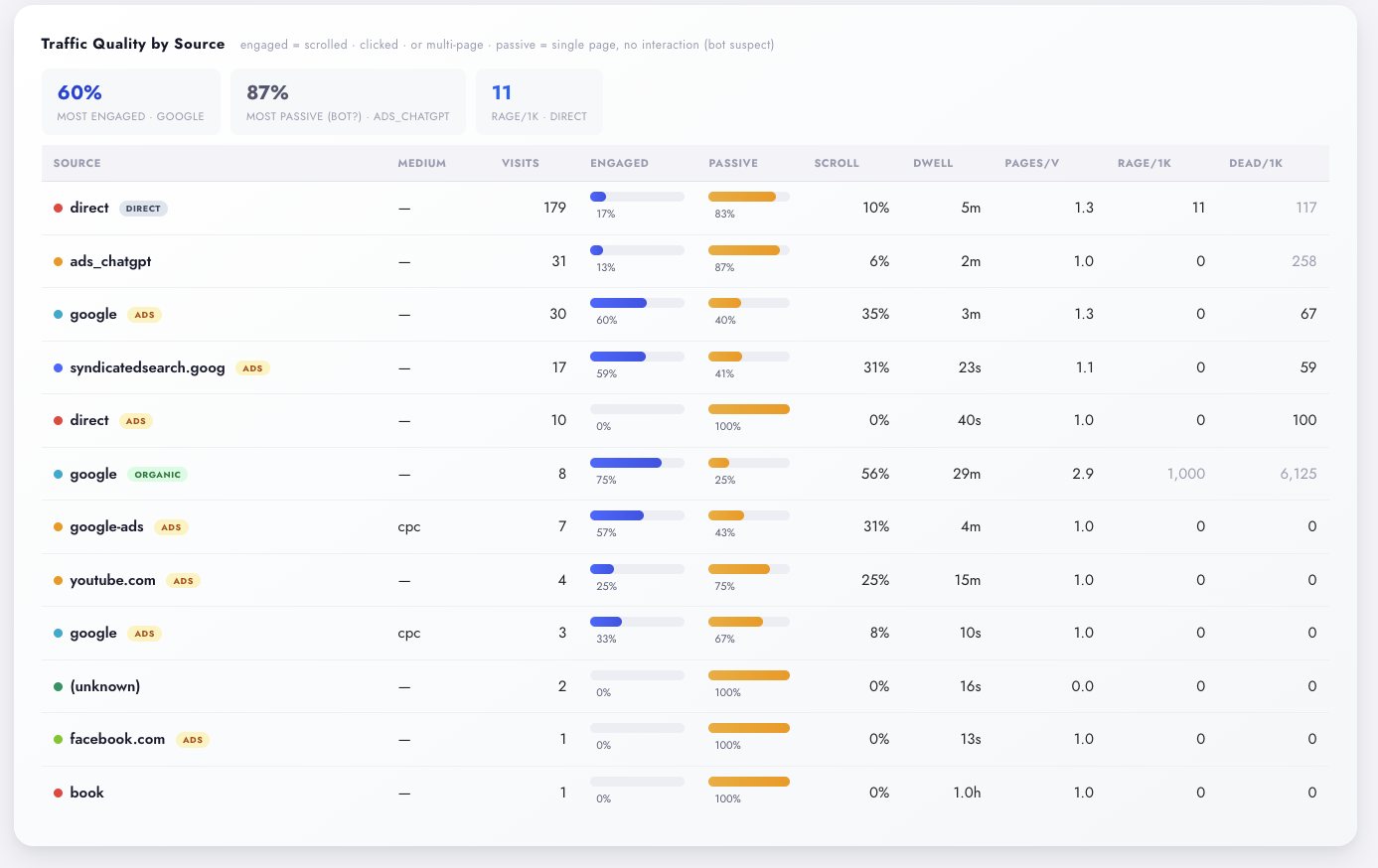
Traffic quality by source in Digenio AI v2: engaged versus passive share bars per source with scroll, dwell, pages per visit, rage and dead clicks per thousand visits
Live: engaged vs passive per source — bot suspects stand out
6

Engaged vs passive — bot-suspect filtering built in

Passive visits — one page, zero clicks, zero scroll — are the signature of bots and scrapers. Digenio scores every source on Engaged% vs Passive%, and surfaces rage clicks and dead clicks per 1,000 visits, so you can cut spend on channels delivering junk.

  • Engaged = multi-page, any click, or any scroll
  • Rage & dead clicks per 1k visits per source
  • Internal traffic excluded and shown separately
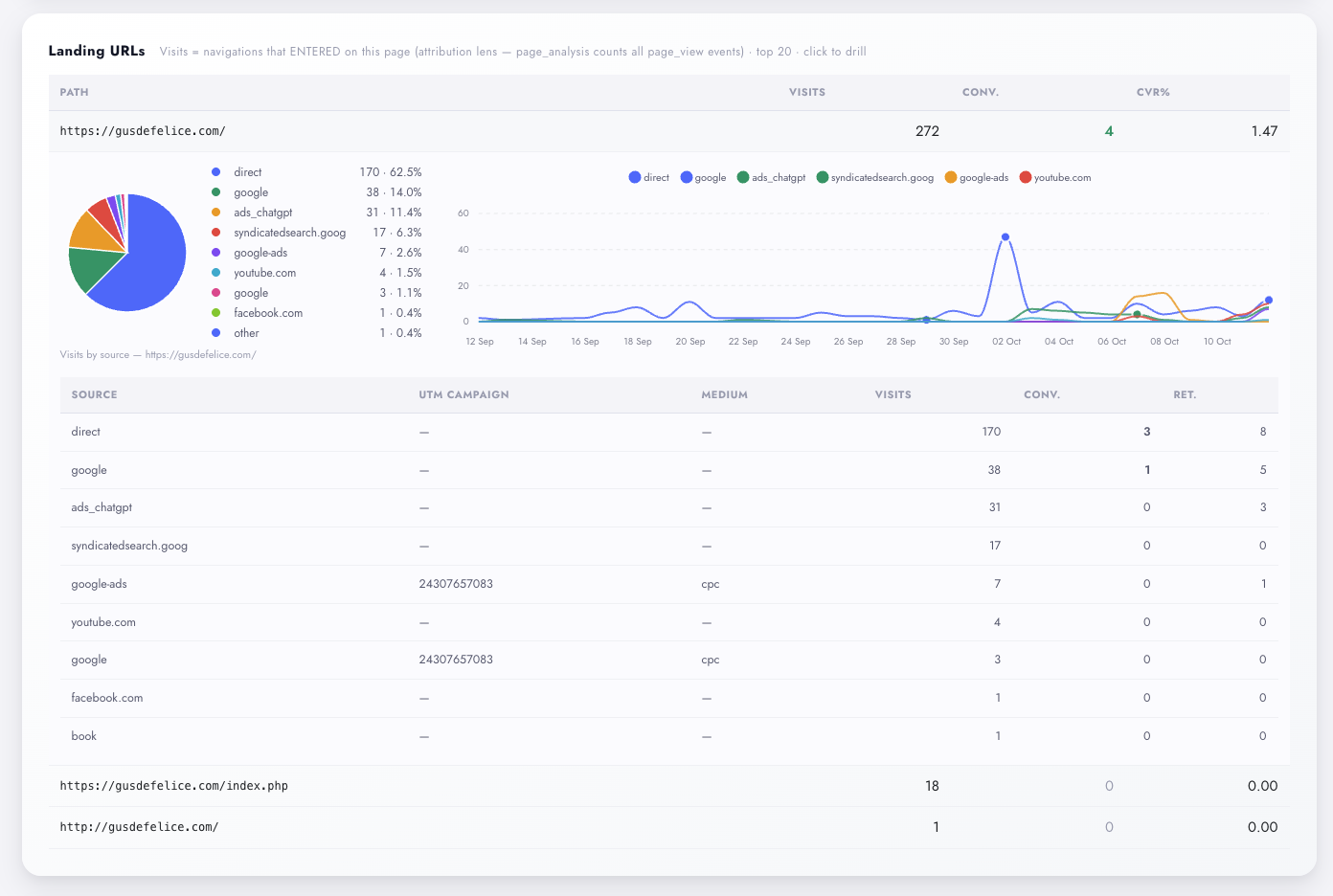
Landing URLs in Digenio AI v2: top entry pages with visits, conversions and CVR, drill-down pie chart of visits by source and daily visits trend line chart
Live: landing URLs with per-URL source mix and daily trend
7

Which landing pages pull visitors in

The top 20 entry pages with visits, conversions and CVR — attributed through the visits that entered on the page, not everyone who passed through. Click any landing page to open the sources and UTMs behind it.

  • Entry-visit attribution lens — honest by construction
  • Drill-down: sources / UTMs per landing page
  • Pairs with Page Analysis for the single-URL deep dive
Your data, your shard

First-Party by Architecture

Every query is scoped to your tracking ID and your site's own data shard. No cross-site sampling, no cookie-consent whitelisting gymnastics, no data you can't export.

Per-customer scoping

Visits, conversions and attribution fields live in your shard of the backbone — materialized per site, queryable only through your authenticated session.

Internal traffic, excluded

Your own team's visits are filtered out automatically and counted separately — no IP allowlist to maintain, no "why is direct up 400%" mysteries.

GDPR-ready tracking

First-party collection without third-party ad cookies. Attribution works on referrer, UTMs and click-ids — no cross-site fingerprinting required.

FAQ

Questions, Answered

A traffic sources report shows where your visitors come from. Digenio's goes further: every visit carries conversions, CVR%, paid-vs-organic classification (via click-ids, not just UTM tags), first-touch attribution, and a quality score that flags bot-like traffic — first-party, with no GA4 setup or sampling.
When someone clicks your ad, the landing URL carries a click-id — gclid for Google Ads, fbclid for Meta, gads for Google Ads Display. Digenio reads these directly from the counters layer, so even visits with missing or mangled UTM tags are still classified as paid. The Paid Coverage panel shows the share per source and names the sources where untagged paid traffic is hiding.
Last-click credits the source of the visit that converted. First-touch credits the source of the visitor's first-ever visit to your site. A visitor who discovers you through organic search and converts three weeks later via a paid retargeting click is an "organic win" under first-touch and a "paid win" under last-click. Digenio shows both models side by side — plus a divergence table listing every conversion where they disagree, so you can judge channels that open doors versus channels that close deals.
Every visit is scored on behaviour: a passive visit is a single page view with zero clicks and zero scroll — the signature of bots, scrapers and prefetchers. The quality panel shows Engaged% vs Passive% per source, plus rage and dead clicks per 1,000 visits, so junk channels stand out immediately. Internal traffic (your own team) is excluded automatically and reported separately.
A conversion is a visit where a tracked form was completed. CVR% = converting visits ÷ visits × 100, computed per source × medium row — with the previous equal-length period fetched automatically so every KPI card and table cell carries its own period-over-period delta. Pair it with Form Intelligence to see the fields and friction behind each completion.
No. Install the Smart Tracking snippet and the report populates itself — referrers, click-ids and first-touch sources are captured without any tagging discipline. UTMs simply add resolution on top: when you do tag campaigns, they get their own rows, drill-downs and daily trends. (And when tags fail, click-ids still catch your paid traffic.)

See also

Page Analysis — dissect any single URL Heatmaps — see where those visitors click SmartChange — pin what changed on each page Lead Intelligence — who the visitors are

Stop guessing.
Start knowing.

See exactly which marketing drives revenue —
from first click to closed deal.

Free 7-day trial
GDPR ready