Form analytics · Lead attribution · CRM routing

Form Intelligence: Every Lead, Fully Attributed

Forms that don't just collect leads — they tell you which campaign produced them, and route them to your CRM in seconds. See views, interactions and submissions per form, with full UTM attribution on every lead, GDPR consent recorded per submission, and spam filtered before it ever reaches you.

Views → submissions funnel Full UTM attribution GDPR consent per lead Instant CRM routing
area.digenio.ai/v2/form-intelligence
3 leads in the last hour
Form funnel · "Request a demo" · last 30 days
Views2,847
Interactions1,912
Submissions348
↓ 42% drop-off on step 2 — fix the phone field
Latest attributed lead · routed to CRM 2s after submit
MR
Marco Rossi · Request a demo · today 12:41
utm_source: google utm_medium: cpc utm_campaign: spring-launch consent: stored ✓ reCAPTCHA: passed ✓ → CRM: synced
The old way

You Collect Leads. You Just Don't Know Where They Came From.

A form that emails you a name and an address is a mailbox, not a marketing instrument. Without attribution and drop-off data, every campaign decision is a guess.

Leads arrive unattributed

"How did you hear about us?" is not attribution. The lead lands in your inbox with no UTM data, so the campaign that paid for it gets zero credit — and the next budget meeting is based on vibes.

Forms are black boxes

You know how many submitted. You don't know how many saw the form, started filling it, and abandoned at which field. The biggest conversion wins are hiding exactly there — and you'll never see them.

Leads rot before the CRM

Export, re-type, copy-paste. Every manual step between a submit and your CRM costs minutes of speed-to-lead — and speed-to-lead is the whole game. Meanwhile spam submissions pollute everything.

What you can do

Every Form a Measured, Connected Funnel

Build the form, embed it anywhere, and watch every step — from first view to CRM record — in one place.

Views → interactions → submissions

Per form, at a glance: how many people saw it, started filling it, and finished. Drop-off between steps is visible immediately — you'll know which field kills conversions without watching a single session replay.

Funnel

Full UTM attribution per submission

Every lead carries its source, medium, campaign, term and content — stored on the submission itself. When the CFO asks which campaign produced the pipeline, you answer with a query, not a survey.

Attribution

GDPR consent stored per submission

Consent is captured in the form and stored with each submission record — timestamped, per-field where needed. Audit trail by default, not by spreadsheet.

Privacy

reCAPTCHA + spam normalisation

Google reCAPTCHA screens bots at the gate; suspicious submissions are normalised and flagged instead of polluting your lead list. Your sales team sees humans, not noise.

Protection

Instant email notifications

The moment a lead submits, the right people get an email — with the full context: form, fields, attribution, consent. Speed-to-lead measured in seconds, not in someone's inbox refresh habit.

Alerts

Sphere/CRM field mapping + embed anywhere

Map form fields to CRM fields once; every submission lands in your CRM — via the Sphere bridge — correctly formatted. Embed the form on any site as an iframe or script from forms.digenio.ai. No developer needed.

Routing
Under the hood

From Builder to CRM, Four Steps

1

Build

Design the form in the React builder — fields, steps, branding, consent text, reCAPTCHA. No code; the builder outputs a ready-to-serve form definition.

2

Serve

form_generate.php renders the form and publishes it through forms.digenio.ai — embed it on any site with an iframe or a script tag.

3

Log

Every view, interaction and submission is written to the form events database — with UTM parameters, consent status and spam scoring attached to each record.

4

Route

bridge_sphere.php maps the submission to your CRM fields and delivers it — while email notifications go out instantly. Lead in CRM: seconds after submit.

In the product

Form Intelligence, Widget by Widget

A mock overview of the v2 view — forms in, attributed leads out. The real product: ten live screenshots below ↓

Forms by conversion
Request a demo/book-demo
18.2%348 / 1,912
Newsletter signup/blog
24.7%512 / 2,072
Quote request — 3 steps/pricing
9.1%77 / 846

The 3-step quote form underperforms — Form Intelligence shows exactly where it loses people.

Submissions by campaign
CampaignSourceLeads
spring-launchgoogle / cpc124
linkedin-retargetlinkedin / paid89
newsletter-maymail / email71
(organic)google / organic64

Full source / medium / campaign / term / content on every submission — roll it up any way you want.

Quality & compliance
OK
348 valid submissions · reCAPTCHA passed · consent stored
100% consent logged 0 false positives
SP
27 spam, auto-flagged · normalised & quarantined
never reached the CRM

Your sales team only ever sees real, consented, human leads.

Inside the product

Real Screens, Real Answers

Every card below is a live screenshot from the v2 Form Intelligence view — no mockups. The product UI ships in English and Italian, and all ten diagnostics are live today.
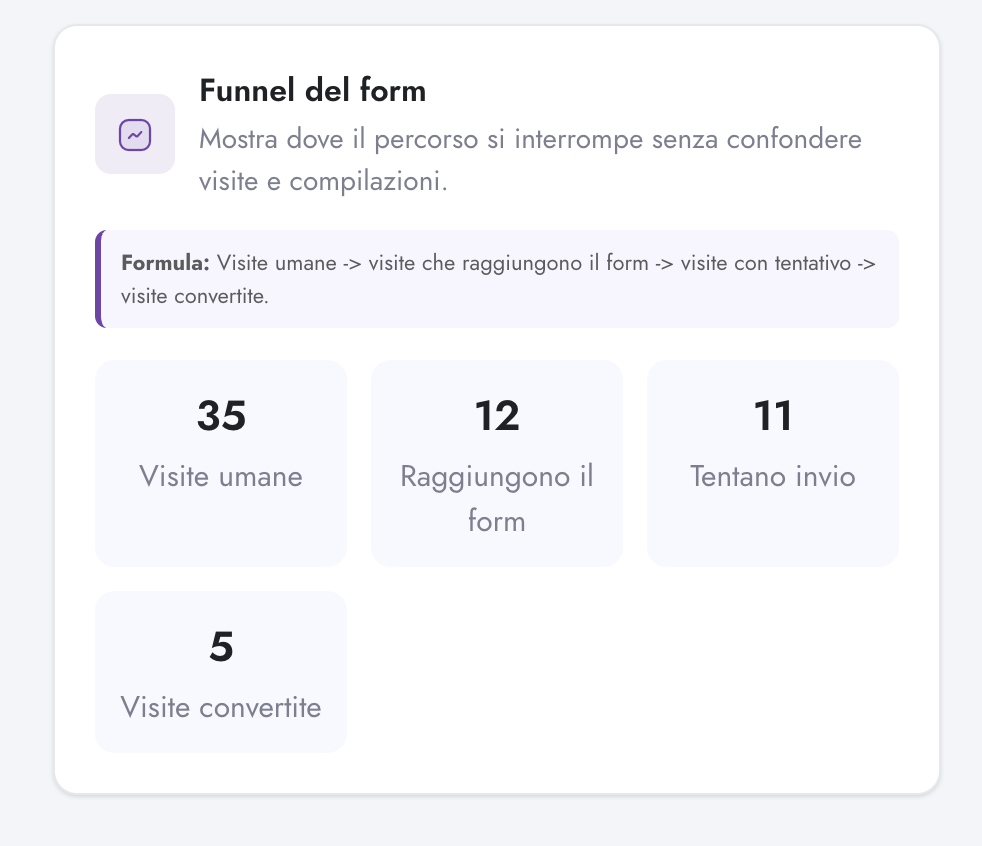
Diagnose the funnel
Form funnel card in Digenio AI v2: human visits, reach form, attempt submission, converted visits
1

Where the journey actually breaks

Four honest stages — human visits → visits that reach the form → attempts to submit → converted visits — with the formula printed on the card so the whole team reads the numbers the same way. No mixing page views with form fills: you see exactly which step leaks, and by how much.

  • Bot traffic is excluded from the denominator — humans only
  • Reach, attempt, convert: three separate leak points, not one blur
  • The formula sits on the card itself — zero definition debates in meetings
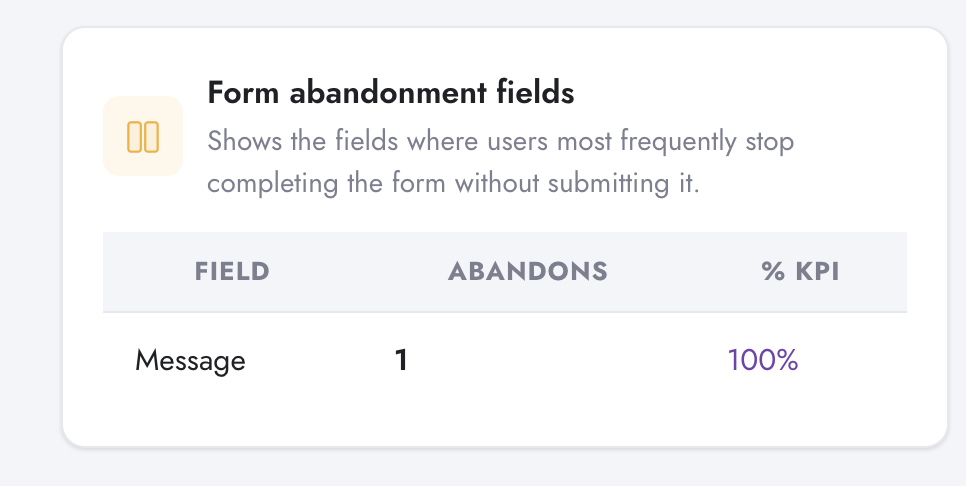
Form abandonment fields table in Digenio AI v2: field, abandons, percentage KPI
2

The exact field where people stop

You already know the form leaks. This card tells you where. Abandonment is attributed field by field, ranked, with each field's share of total drop-off — so the fix becomes a design decision instead of a guessing game.

  • Field-level abandonment counts and percentage share of the total
  • Worst offender ranked first — your fix list writes itself
  • Pairs with field error analysis: stopping and failing are different diseases
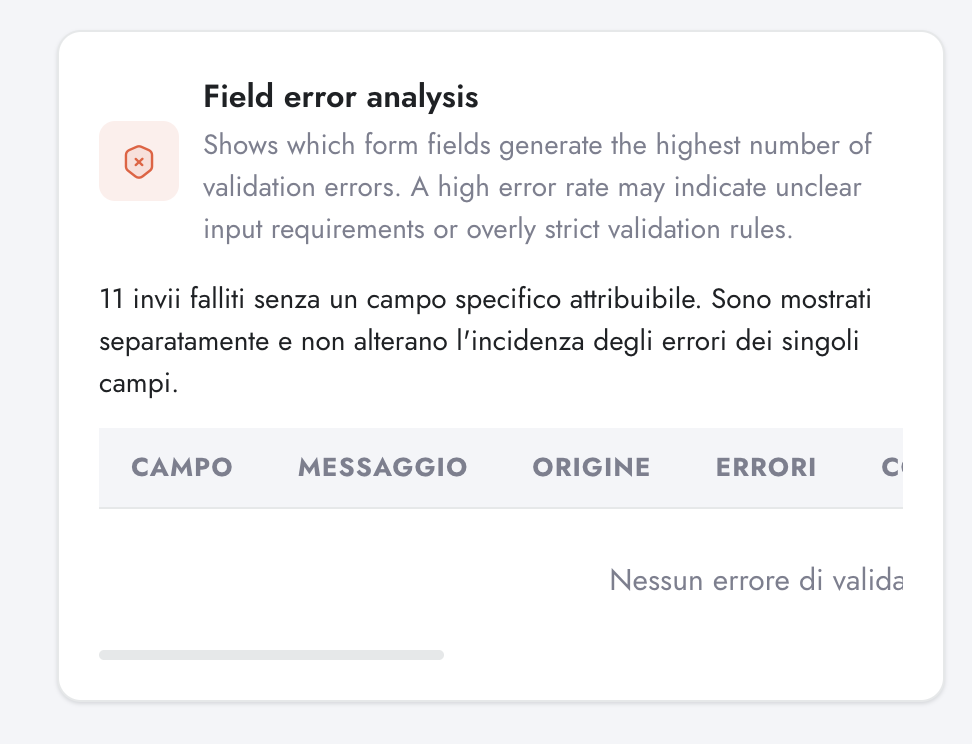
Field error analysis table in Digenio AI v2: field, message, origin, errors
3

Validation errors, field by field

Which fields generate validation errors, with the error message and its origin for each. A field with a high error rate means one of two things: unclear input requirements, or validation rules that are too strict. Both are fixable — once you can see them.

  • Errors per field, with message and origin
  • Failed submissions with no attributable field are tracked separately, so they never distort per-field rates
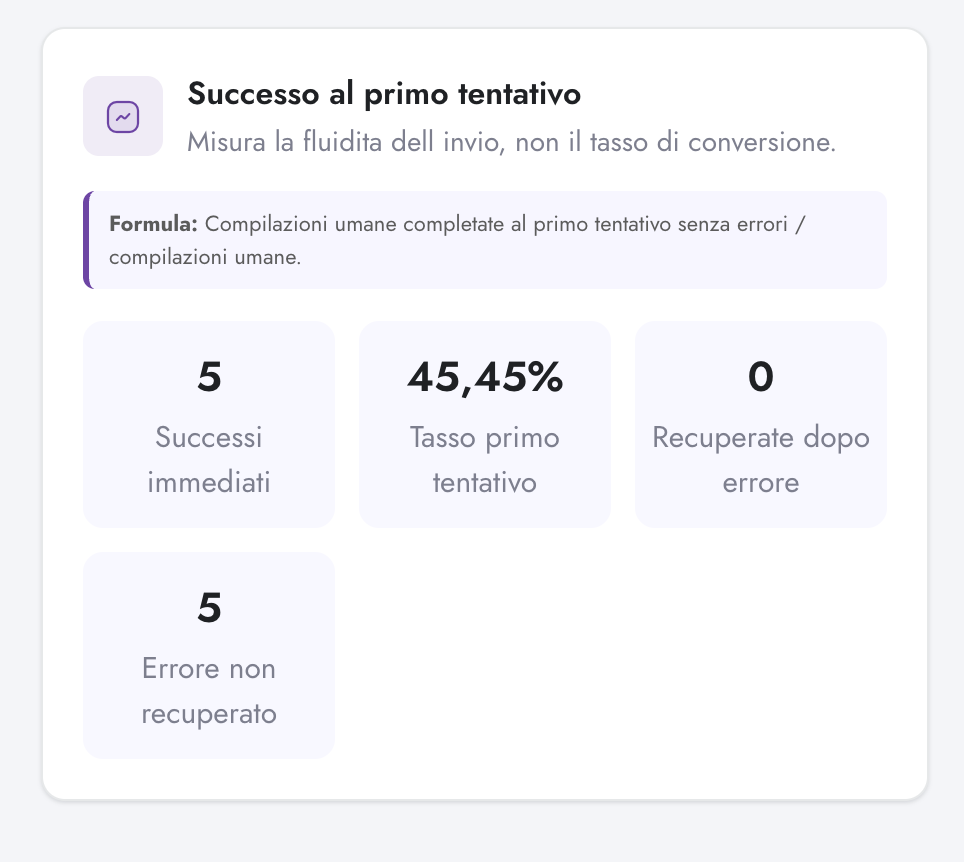
First-attempt success KPIs in Digenio AI v2: immediate successes, first-attempt rate, recovered, unrecovered
4

How smooth is the submit?

Conversion rate tells you who finished. This measures what finishing felt like: submissions completed on the first attempt with zero errors, versus everything that needed a retry. It's a UX metric, not a marketing metric — and the early-warning light for form friction.

  • Immediate successes and first-attempt rate at a glance
  • Clean submissions separated from retries and failures
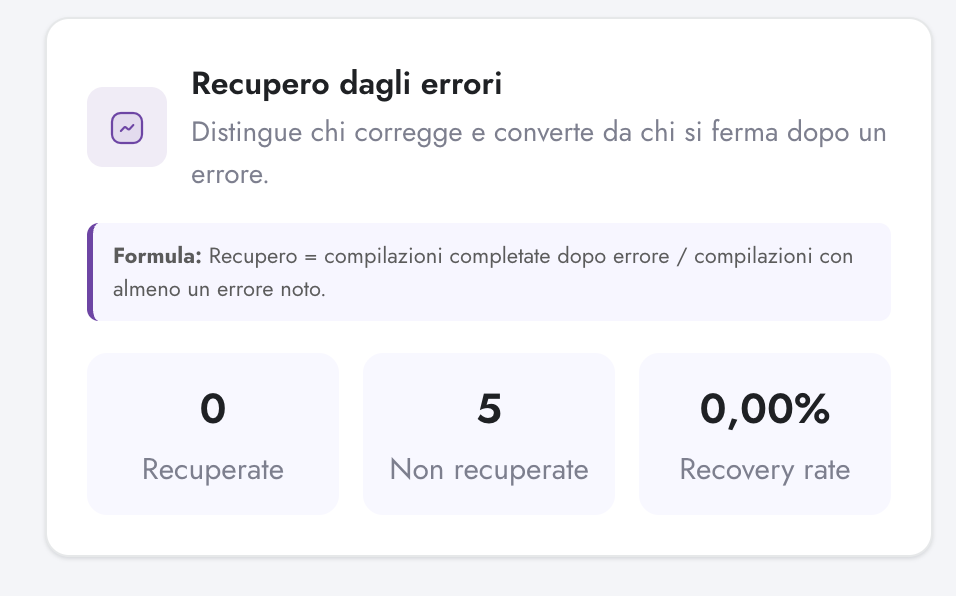
Error recovery KPIs in Digenio AI v2: recovered, not recovered, recovery rate
5

Who fixes the error — and who gives up

When a visitor hits a validation error, two things can happen: they correct it and convert, or they leave. The recovery rate tells you which. A zero recovery rate after errors is a red flag no standard analytics report will ever surface.

  • Recovered vs. not-recovered submissions after an error
  • Recovery rate = completed-after-error ÷ submissions with at least one error
Know who converts
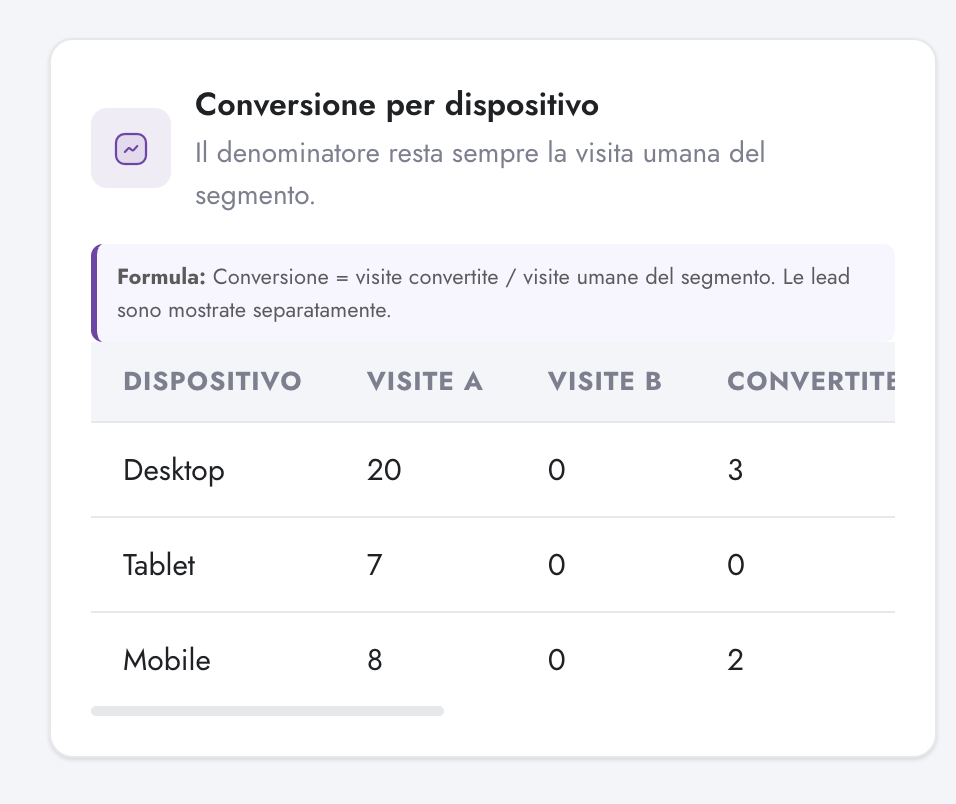
Conversion by device table in Digenio AI v2: desktop, tablet, mobile with A/B visits and conversions
6

Desktop, tablet, mobile — honestly split

Visits and conversions broken down by device, on one clean denominator: human visits of the segment. If your form converts on desktop and dies on mobile, this is the card that says so out loud.

  • A/B variant visits shown side by side where an experiment is running
  • Same formula as every other card — converted visits over human visits
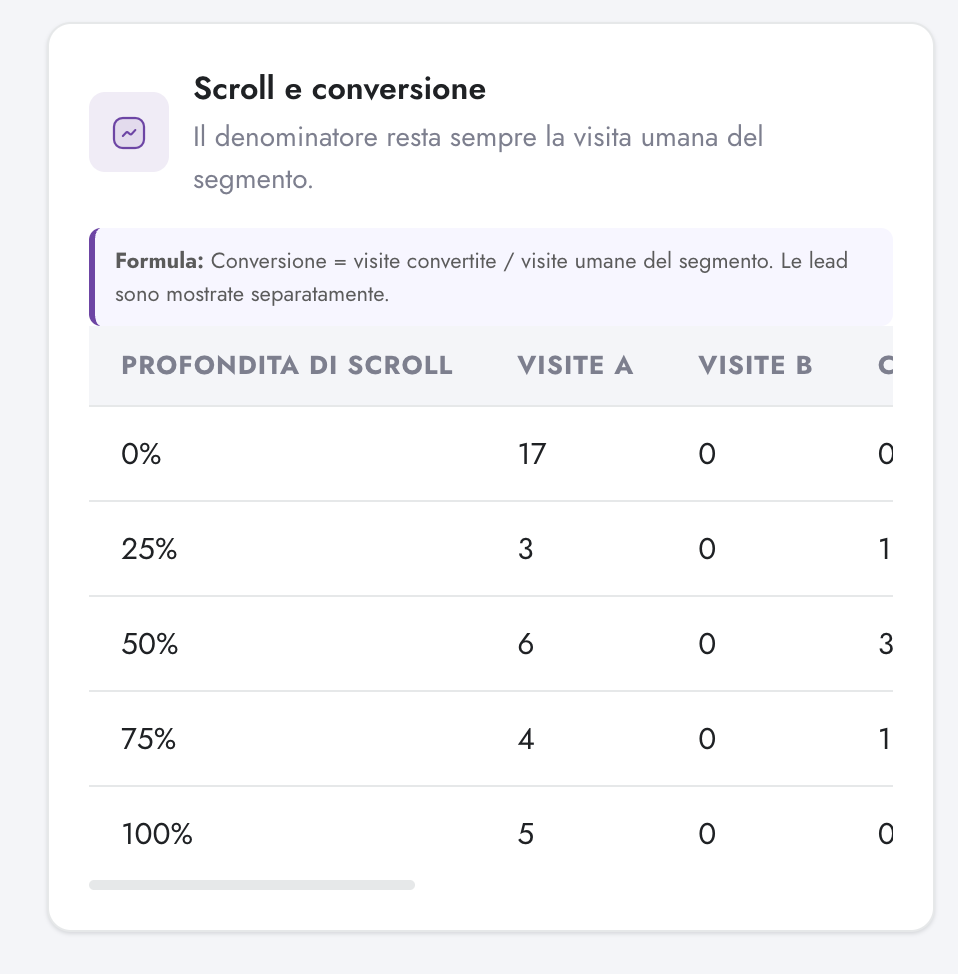
Scroll and conversion table in Digenio AI v2: conversions by scroll depth bucket
7

How deep they scroll before they commit

Conversions bucketed by scroll depth — 0, 25, 50, 75, 100%. If most conversions happen at 50% scroll, your form is buried. If people convert without scrolling, the placement is already right. Either way you learn where the page earns the submit.

  • Five depth buckets, from zero to fully read
  • Exposes buried forms — and confirms well-placed CTAs
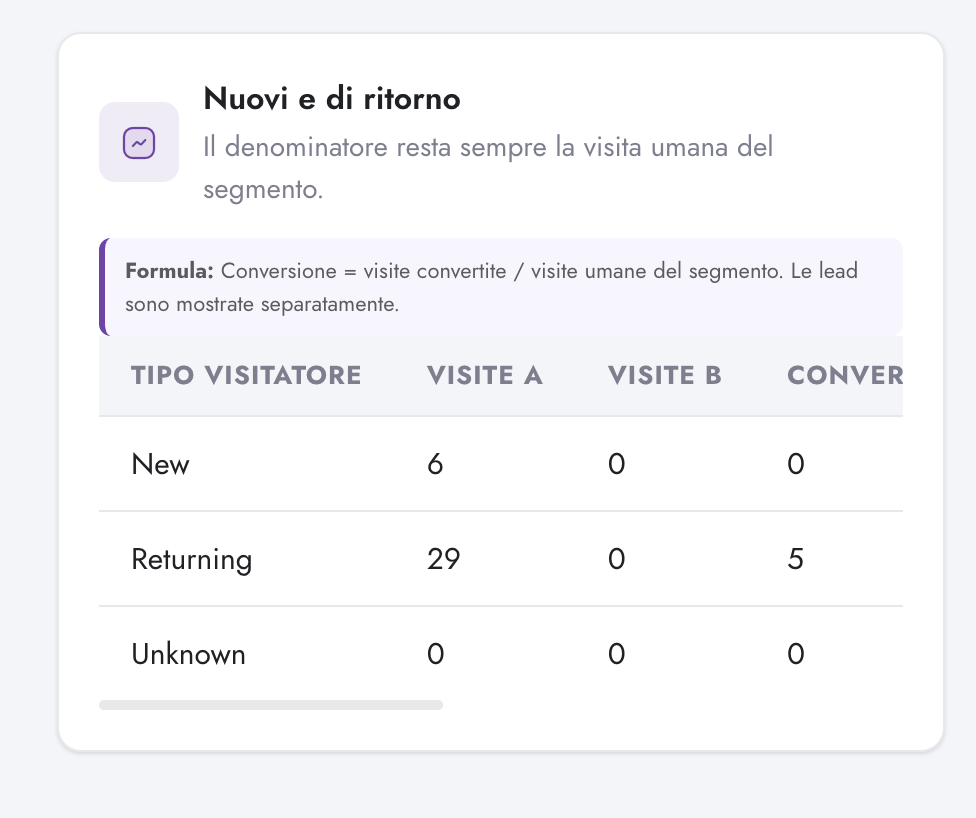
New and returning visitors table in Digenio AI v2: visitor type with visits and conversions
8

Who actually converts

New, returning and unknown visitors with visits and conversions for each. If returning visitors convert at multiples of new ones, your retargeting math changes. If it's the opposite, your nurture math does. One table, real budget decisions.

  • Visitor type split with visits and conversions
  • Feeds retargeting vs. nurture spend decisions with facts
Trust the numbers
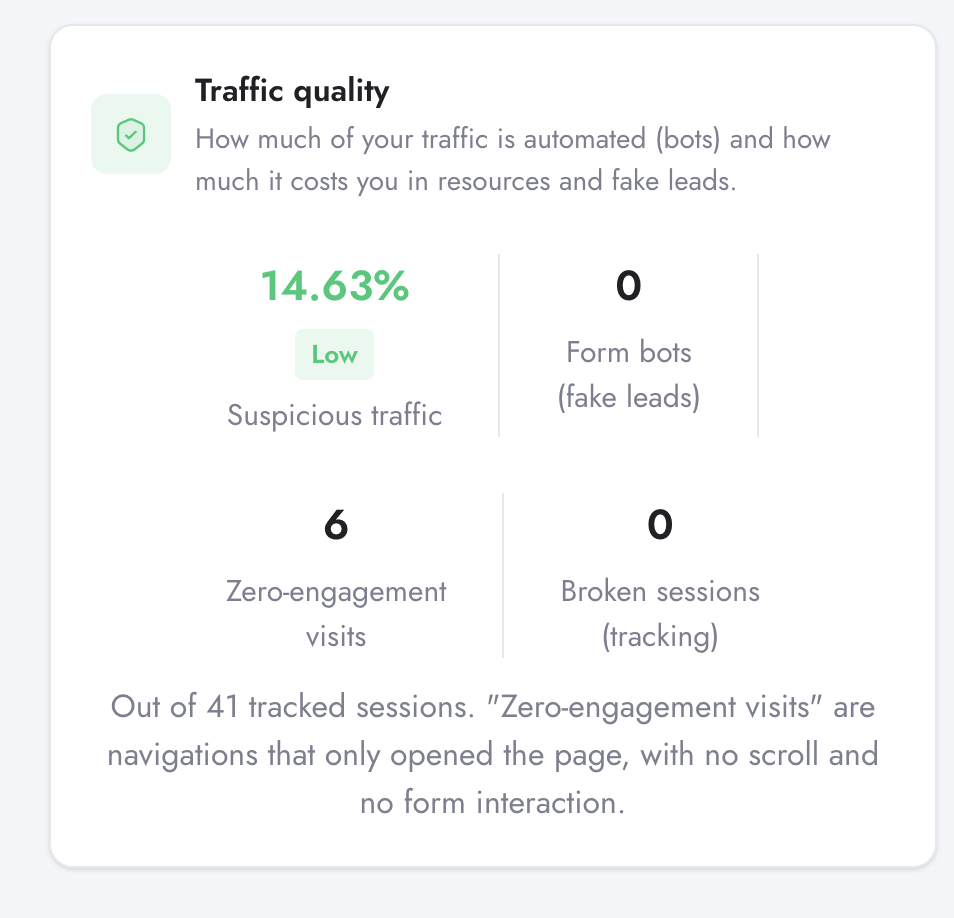
Traffic quality card in Digenio AI v2: suspicious traffic, form bots, zero-engagement visits, broken sessions
9

How much of your traffic isn't human

Suspicious traffic share with a severity rating, form bots producing fake leads, zero-engagement visits and broken tracking sessions — all against the total of tracked sessions. Because every other number on this page is only as honest as the traffic behind it.

  • Suspicious-traffic percentage with severity badge
  • Fake form leads counted separately — bots never reach your CRM
  • Zero-engagement and broken sessions visible, not hidden in averages
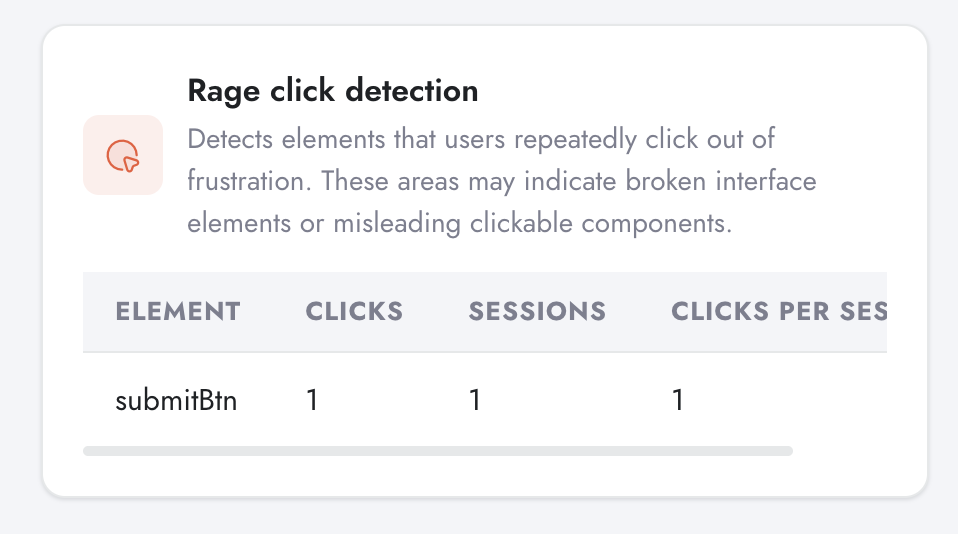
Rage click detection table in Digenio AI v2: element, clicks, sessions, clicks per session
10

Where users click in frustration

Repeated clicks on the same element are a frustration signal: something looks clickable and isn't — or looks broken and is. Digenio surfaces the element, the sessions and the clicks-per-session. It's the shortest path from analytics to a UX fix.

  • Element, clicks, sessions and clicks-per-session in one table
  • Flags broken or misleading interactive elements automatically
Data & integrations

One Pipeline: Form to CRM

Sources
  • Forms built in the React builder
  • Views & interactions per embedded form
  • UTM parameters on every submission
  • Consent + reCAPTCHA signals
Backbone
  • form_generate.php serves each form
  • Events logged to the form events DB
  • Spam normalisation & validation
  • Per-client isolated shard database
Destinations
  • Instant email notifications
  • CRM routing via Sphere connector
  • Dashboards — leads feed the KPI strip
  • User Analysis — the session behind the lead
FAQ

Questions, Answered

Submissions route through the Sphere connector, which maps your form fields to CRM fields. Digenio's Sphere integration works out of the box, and field mapping is flexible enough to bridge into other CRMs — including HubSpot. Bring your CRM to the demo and we'll map it live.
Yes — the React builder supports multi-step forms out of the box. Better: Form Intelligence tracks the funnel per step, so you'll see exactly which step loses people, not just that the form "converts at 9%".
Completely. Colours, fonts, radius, buttons, consent copy — the form looks like it was built by your designer, because you built it. Agencies can match each client's brand from the same builder.
Yes. Every form is publishable from forms.digenio.ai as an iframe or a script embed. WordPress, Webflow, hand-coded HTML — if the page can run a script tag, it can run your form, with all tracking intact.
reCAPTCHA screens submissions at the gate and suspicious entries are normalised and flagged — they never reach your CRM or your sales team. GDPR consent is captured in the form and stored on each submission record, timestamped — a clean audit trail by default. And because form events run on the same first-party, consent-first tracking as the rest of the platform (see User Analysis), everything stays consistent.

Stop guessing.
Start knowing.

See exactly which marketing drives revenue —
from first click to closed deal.

Free 7-day trial
GDPR ready